How to Run a Class Waitlist That Actually Fills Classes
A waitlist only works if spots move on their own. How to set capacity, late-cancel windows and automatic promotion so full classes stay full.

6 min read
A full class with two no-shows is a class that could have taken two more people. Most gyms know this and still run their waitlist by hand: a note at the desk, a text to whoever asked first, a spot that goes unused because nobody got to it in time. A waitlist pays for itself only when the spot moves without anyone touching it.
This is how to set one up so it does.
Decide what "full" means first
A waitlist starts where capacity ends, so capacity has to be a real number. Not the number of people who could fit in the room, but the number the coach can actually coach. For a strength class that's usually the rack count. For a spin class it's the bikes. For a kids' class it's whatever ratio you've promised parents.
Set that number on the class type, not on each class. In Finegym a class type carries its capacity, its length and its booking rules, and every scheduled class inherits them. Change it once and next week's classes follow.
If some classes of the same type are bigger (the Saturday session in the bigger room), make them their own class type with their own capacity. Don't raise the weekday type's capacity to cover the exception; you'll over-book the weekday ones.
Open booking early, close it late
Two settings decide how a waitlist behaves: when booking opens and when it closes.
Open booking far enough ahead that regulars can book their week in one sitting. Seven days is the common choice. Open it too early (a month) and the schedule fills with bookings people forget about; those become your no-shows.
Close booking as late as the coach can tolerate. If a class starts at 6:00 and you close booking at 5:00, a spot that opens at 5:15 is dead. Closing at 15 minutes before start is late enough that waitlisted members can still get there and early enough that the coach isn't surprised by a new name as the warm-up starts.
The late-cancel window is the whole game
A waitlist moves when someone cancels. If members can cancel for free until the minute the class starts, they cancel at the last minute, and the spot moves too late to be used. If they can't cancel at all, they don't cancel; they just don't come, and the spot never moves.
The late-cancel window sits in between. Up to the window, a member can cancel freely and the first person on the waitlist gets the spot. Inside the window, they can no longer cancel on their own: the booking stands, and if they don't come, the no-show can count as a visit against their membership. Staff can still cancel for them when there's a real reason, and that frees the spot for the next in line.
The right window is however long a waitlisted member needs to decide and travel. For evening classes in a city, two hours works. For 6:00 AM classes, the night before: nobody checks their phone at 4:30 to grab a spot.
Write the rule down where members see it, on the class description and in your business policies. A late-cancel charge that members didn't know about causes more arguments than it saves.
Let the software move the spot
The waitlist should promote on its own. When a booking is canceled and someone is waiting, the first person in line is booked in and told, by email and in the app, with the class and time in the message. Nobody at the desk should be involved.
Two details matter:
- Order is first come, first served. Don't let staff reorder the list by hand, even for a regular. The moment members believe the list is negotiable, they start asking.
- The promoted member can cancel. Being moved from the waitlist into the class at 4:00 for a 6:00 class means they may no longer be able to come. Give them the same cancel rules as anyone else. If they cancel outside the late window, the spot moves again to the next in line.
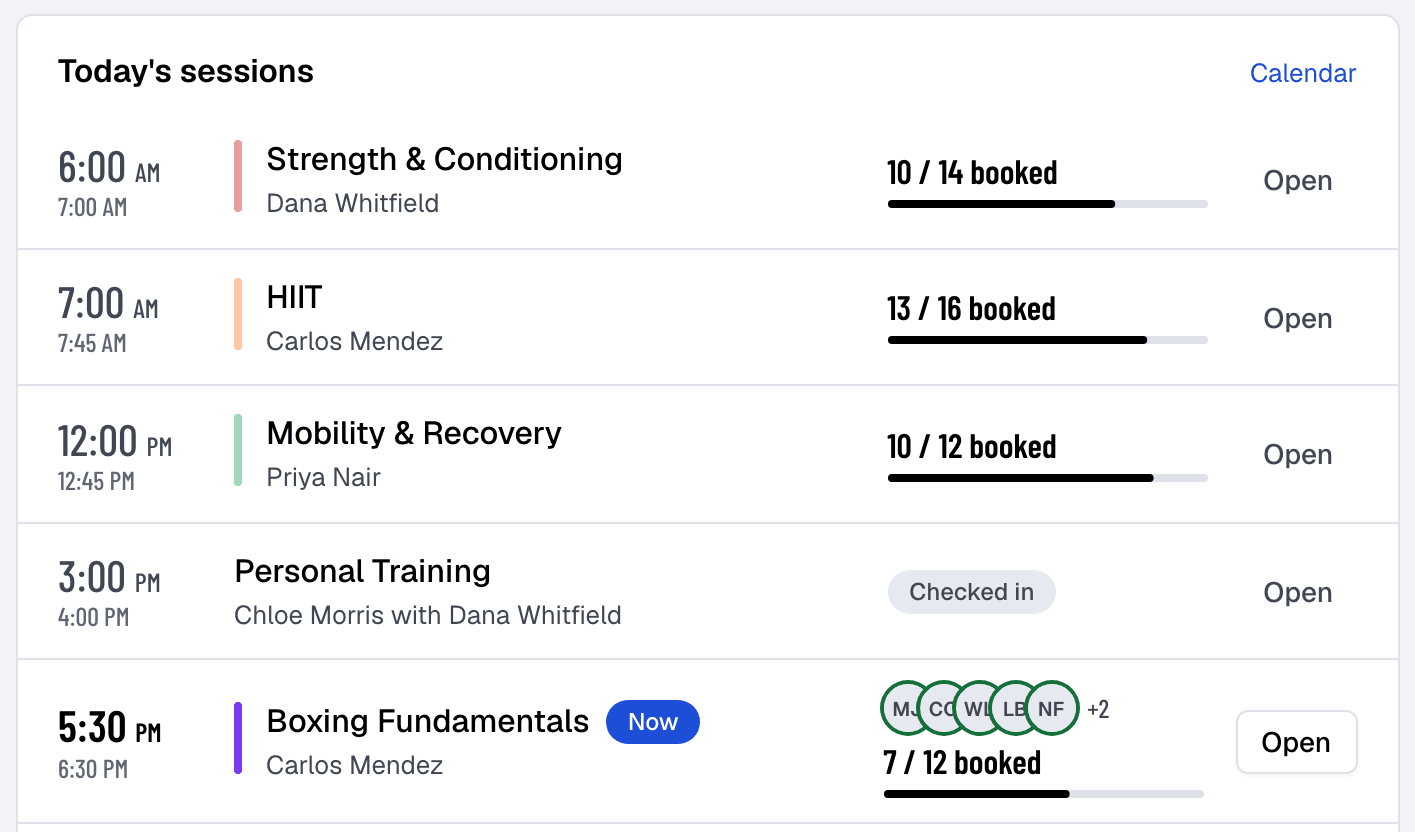
In Finegym, members join the waitlist from the app or your website with one tap, and the promotion happens the moment a spot opens, so the class card on the Today page shows the real count all day.
Cap the waitlist too
A waitlist of twenty for a class of twelve is a sign the class needs a second session, not a longer line. People who sit at position nine learn not to bother.
Watch the waitlist length the way you watch capacity. When it's regularly more than half the class size, that's useful information: it tells you to add a class at that time, or to move that coach to a bigger room.
What to watch each week
Three numbers tell you whether the waitlist is doing its job. They're on the reports page, and the first two are on the Today page as the day goes on.
- Booked against capacity, per class. Classes at 100% with a waitlist every week want a second session. Classes at 60% with no waitlist want a different time, or fewer spots so they feel full.
- Late cancels and no-shows per week. If they're climbing, the window is too short or the charge isn't being applied. If they're near zero, the window may be so strict that people have stopped booking ahead.
- Waitlist promotions that turned into visits. A promotion that doesn't become a check-in is a spot that moved too late. If that happens often, close booking later and shorten the window.
A setup that works for most gyms
If you want a starting point and will tune it from the numbers:
- Capacity: what the coach can coach, set on the class type.
- Booking opens: 7 days ahead.
- Booking closes: 15 minutes before start.
- Late-cancel window: 2 hours for daytime and evening classes, 12 hours for classes before 8:00 AM.
- Inside the window: no self-service cancel; a no-show counts as a visit on class packs and limited plans.
- Promotion: automatic, with an email and an app notification.
Set it once, tell members the rule in plain words, and let the spots move. The class that used to run with two empty racks is now the class with a waitlist, and the waitlist is what fills the one after it.
About the author
Founder & CEO
Vedad Burgic is the Founder and CEO of Finegym, a gym management platform built to help fitness businesses streamline operations and grow. With a background in software engineering and a passion for the fitness industry, Vedad created Finegym to solve the real challenges gym owners face every day — from scheduling and billing to member retention. He writes about gym management strategy, fitness technology, and building scalable fitness businesses.
Get new articles by email
Get the latest articles and tips delivered to your inbox.