Staff roles
Staff roles and permissions that match each job
Everyone who works at your business signs in with their own email and sees only what their role allows. The front desk checks members in and sells, coaches run their own classes and appointments, and managers can do everything but what only the owner can.
On every plan, Free included
Roles
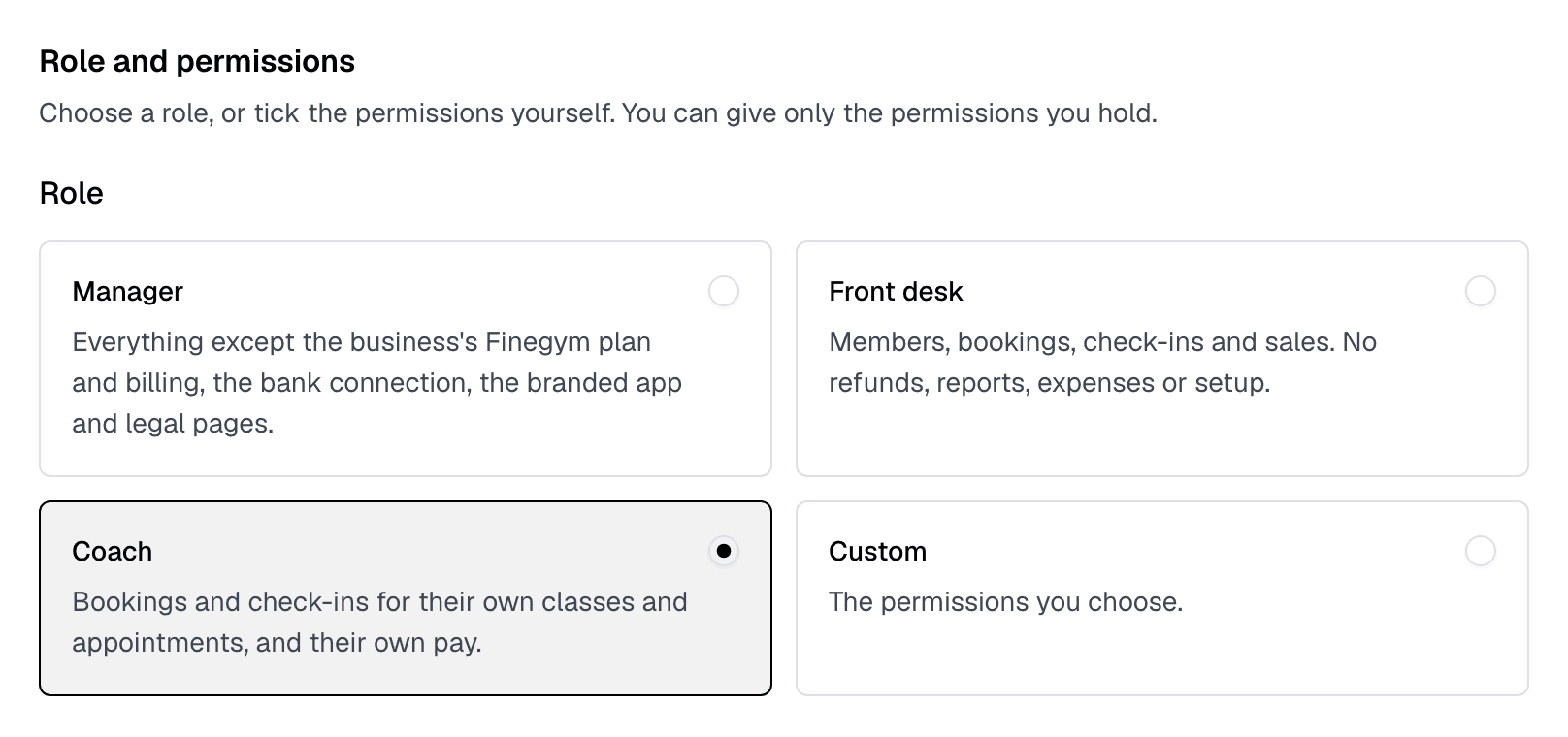
Five roles, named after the job
Every staff member can look up members and leads and see the schedule. Their role decides what they can change, and whether they see money.
- Owner.
- Every permission, plus what only the owner can do: the business’s Finegym plan and billing, the bank connection, the branded app, the legal pages and the time zone. Each business has one owner.
- Manager.
- Every permission, but not what only the owner can do.
- Front desk.
- Members, bookings, check-ins and sales. No refunds, reports, expenses or setup.
- Coach.
- Bookings and check-ins for their own classes and appointments, and their own pay.
- Custom.
- The permissions you tick, for any job in between.
Permissions
Or tick the permissions yourself
A role is a set of permissions. Tick a different set and the role becomes Custom. Payments, invoices and saved cards are seen only by staff who hold Sales, Refunds or Reports.
- Members.
- Add and edit members, families, notes and documents, import members and handle leads.
- Bookings.
- Book members into classes and appointments, cancel bookings and run waitlists.
- Check-ins.
- Check members in, remove check-ins and switch on front desk mode.
- Sales.
- Create invoices, take payments, and sell or change memberships and products.
- Refunds.
- Refund payments. Ticking it ticks Sales too.
- Schedule.
- Set up classes, class and appointment types, and the days you’re closed.
- Plans and products.
- Set up membership plans, products and discounts.
- Reports.
- See reports, revenue, transactions and everyone’s pay.
- Expenses.
- Record expenses and see the income and expenses report.
- Marketing.
- Send campaigns and run automations and segments.
- Staff.
- Add staff, choose their roles and permissions, and set their pay and availability.
- Settings.
- Change the business’s settings, integrations, email templates and documents.
Coaches
Coaches run their own sessions
A coach sees the whole calendar, and who is booked where, but changes only their own classes and appointments. They don’t see payments, reports, expenses, marketing or settings.
- Today, for them.
- Their own classes and appointments for the day, and who has checked in.
- My availability and My pay.
- Every staff member sets the hours they take appointments and sees what they earned.
Book members in
Add an attendee, or put them on the waitlist once the class is full.
Check members in
On the day, or mark them present after the class.
Cancel a booking
And enroll a member in, or take them out of, every class of the series.
Start the Zoom meeting
As its host, for an online class.
Related features
Step-by-step guides
How it works in detail, in the Finegym help center.
Which plan do I need?
Free covers the day-to-day. Starter adds integrations, Growth adds marketing and your own branded app. Starter and Growth start with a 30-day free trial, no card needed.
Compare plans- Expenses and payrollRecord expenses, see income against them month by month, and work out each coach’s pay from the classes and appointments they taught.
- Front desk kioskA self-service kiosk where members check in by QR code or PIN, book today’s classes, buy a plan and sign documents, and walk-ins sign up.
- AppointmentsPersonal training and consultations, booked around each coach's availability.
- Classes and schedulingSchedule group classes, set capacity limits, manage waitlists, and allow members to book directly from the app.
Frequently asked questions
More answers, with steps and pictures, are in the help center. Help Center
As many as you need. Every Finegym plan has unlimited staff, and each person signs in with their own email and password.
Not with the Front desk role. Refunds is a permission of its own; tick it for someone you trust with it, and their role becomes Custom.
Yes. Tick more permissions on their Permissions tab, such as Members so they can add notes. Their role becomes Custom, and their bookings and check-ins still reach only their own classes and appointments.
No. Nobody changes their own role, and you can give only the permissions you hold yourself. The owner’s role never changes; to hand the business over, transfer ownership.
Open on Finegym tomorrow.
Sign up in about two minutes, no card needed, and add your plans, schedule and members at your own pace. Moving from other software? We help for free.