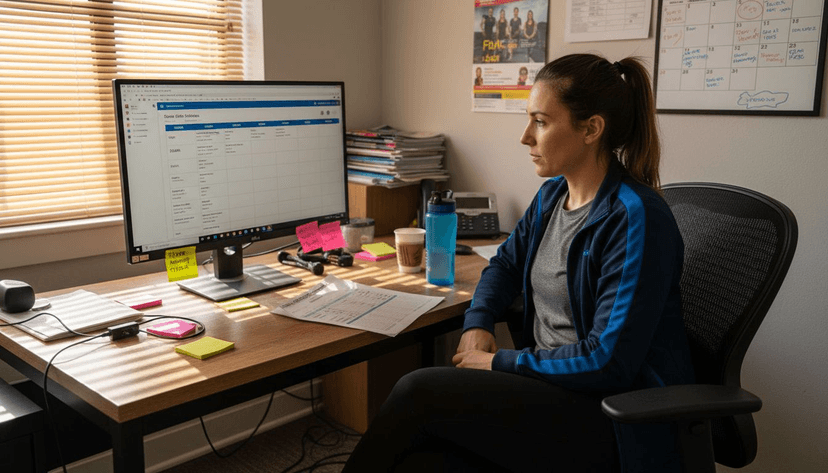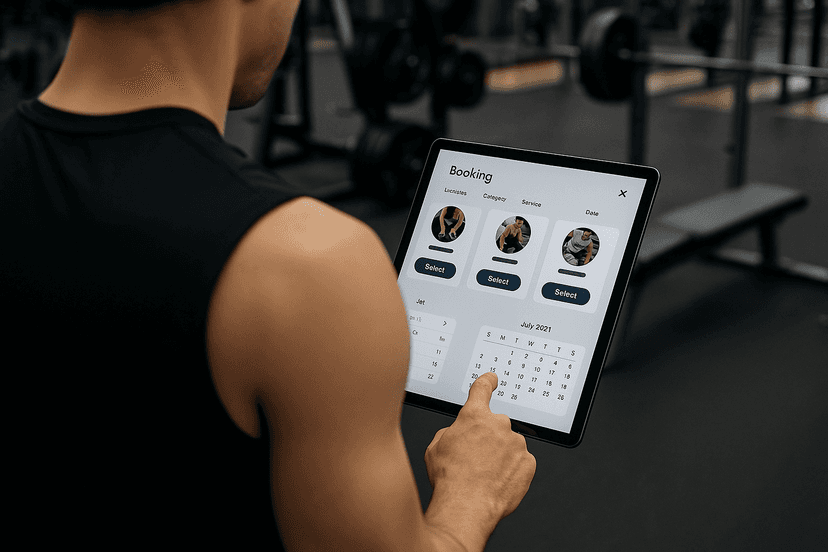

Stabilize your staffing by replacing spreadsheets and group chats with a purpose-built scheduling workflow, backed by a gym management platform that handles shifts, swaps, and payroll in one place. Gyms that make this switch typically see fewer coverage gaps within the first two or three weeks, along with a measurable drop in the hours managers spend building and fixing schedules by hand.
TL;DR:
- Using recurring shift templates and role-based scheduling reduces weekly planning time and prevents assigning staff to unqualified shifts.
- Turning on mobile access and approval workflows streamlines shift swaps and reduces last-minute coverage gaps.
- Connecting scheduling with booking systems and payroll ensures accuracy in hours worked, attendance, and pay, boosting operational efficiency.
- Managing seasonal templates and cross-training staff allows quick adaptation to attendance fluctuations and peak surges.
- Enforcing system-based swap requests and notifications minimizes scheduling errors and improves communication for a busy gym staff.
Table of Contents
- Your One-Week Action Checklist for Staff Scheduling in Gyms
- Which Scheduling Features Actually Matter for Gyms?
- How Do You Build a Weekly Gym Staff Schedule?
- How Do You Schedule Instructors and Freelance Trainers?
- How Should Shift Swaps and Time-Off Requests Work?
- What Reports Actually Control Gym Labor Costs?
- How Does an Integrated Platform Support This Workflow?
- Do Gyms Need Special Labor Law Compliance for Scheduling?
- How Do You Staff for Seasonal Membership Swings?
- How Do You Notify Staff of Schedule Changes Fast?
- Should Staff Scheduling Connect to Member Booking Systems?
- What I'd Tell a Manager Rolling This Out for the First Time
- Get Your Gym's Schedule Running on Finegym
- Sources
Your One-Week Action Checklist for Staff Scheduling in Gyms
You don't need a full software rollout to start fixing chaos this week. Work through these seven moves in order, and the worst scheduling headaches start to fade before your next payroll cycle.
- Build and publish weekly recurring templates for your core shifts (opening, closing, front desk, group classes) so you're not rebuilding the schedule from scratch every Sunday.
- Collect every staff member's current availability and certifications in one place, not scattered across texts and sticky notes.
- Turn on mobile schedule access so staff can check shifts and request swaps from a phone instead of calling the front desk.
- Require manager approval on every swap request instead of trusting informal trade agreements between staff.
- Tag each shift by role, front desk, personal training, group instruction, cleaning, so you can filter and assign faster.
- Turn on time clock functionality tied directly to the published schedule.
- Connect that time data to a payroll export so hours worked match hours paid, automatically.
None of this requires new hires or a big software budget. It requires deciding, this week, that the schedule lives in one system instead of five inboxes.
Which Scheduling Features Actually Matter for Gyms?
Not every feature on a scheduling app's landing page solves a real gym problem. Here's what each capability is actually for, and what breaks without it.
- Shift templates and recurring shifts eliminate the weekly rebuild. Once your opening, midday, and closing shifts are templated, you're editing exceptions instead of starting from a blank grid.
- Role-based scheduling stops a certified personal trainer from getting slotted into a front desk shift, or a front desk hire from getting assigned to lead a class they're not certified to teach.
- Open-shift claims and swap approval workflows keep coverage requests inside the system instead of buried in a group chat where a callout gets lost between memes and reminders about the water cooler. Findmyshift's product research points to templates, role-based assignment, and mobile access as the recurring baseline features fitness businesses rely on.
- Mobile access and automatic reminders cut down on late arrivals and no-shows, because staff see their shift the moment it's published, not when they happen to check a shared document.
- Integrated time tracking ties the schedule directly to payroll and reporting, so hours worked and hours paid are the same number without a manual reconciliation step.
Pro Tip: Before you evaluate any tool by its feature list, list your last five scheduling failures. Match each one to a feature above. If a tool doesn't fix at least three of your five, keep looking.
How Do You Build a Weekly Gym Staff Schedule?
A repeatable process beats a fresh guess every Sunday night. Here's the sequence that keeps a gym staffed without last-minute scrambling.
- Start with the class and booking calendar. Map every scheduled class, appointment slot, and peak open-gym window before you assign a single shift. Facility operator scheduling guidance recommends anchoring staff shifts to the booking calendar rather than building them in isolation.
- Identify your three peak windows. Most gyms have a predictable early-morning rush, a midday lull, and an evening surge. Template shifts around those three windows first.
- Assign roles and attach notes. Link each shift to the qualified staff member and drop in session notes or tasks, so a substitute trainer isn't guessing what a class covers.
- Publish a draft, then finalize. Let staff request swaps through the system before you lock the week. Once it's final, send the notification and treat that version as the source of truth.
- Verify against actual hours. Pull the time-tracking report after the week closes and compare it to what you scheduled. Adjust next week's templates based on where the gaps or overlaps actually happened.
Linking bookings to staffing this way also means the system can suggest who's qualified and free for a given session, which closes last-minute coverage gaps before they turn into a canceled class, a pattern gym-specific scheduling platforms have built entire features around.
How Do You Schedule Instructors and Freelance Trainers?
Part-time instructors and freelance trainers don't work like your full-time front desk staff, and treating them the same way is where most gym schedules fall apart. A few rules keep things predictable on both sides.
- Collect availability on a fixed cadence (weekly or biweekly) and lock it into the system rather than relying on a running text thread.
- Use class-linked assignments so a trainer only sees open shifts relevant to the classes they're certified to teach, not the entire gym's schedule.
- Set a minimum-notice window for freelance assignments, and define pay type per shift (hourly, per-class flat rate, or commission) so there's no ambiguity at payday.
- Apply role filters and attach per-class notes so a substitute instructor knows exactly what's expected, format, equipment, member count, before walking in.
If you run more than one location, this gets more complicated fast. Multi-location operators need a centralized schedule with location filters and shared availability visibility, otherwise the same trainer ends up double-booked across two sites, an operational problem multi-location gym operations run into constantly without that centralized view.
How Should Shift Swaps and Time-Off Requests Work?
Swaps and time-off requests cause more scheduling damage than almost anything else, mostly because they happen outside the system where nobody can verify them. Fixing this is less about technology and more about enforcing a rule: no swap is real until the system says it's real.
- Require every swap request to go through the platform, with manager approval and a timestamped audit trail, not a verbal agreement between two staff members.
- Offer open shifts to qualified staff on a first-come, first-served basis instead of manually phoning down a list.
- Set minimum notice for time-off requests and define blackout periods around your highest-traffic core hours.
- Export every approved swap to payroll immediately so nobody gets paid for a shift they didn't actually work.
Pro Tip: Blackout periods work best when they're tied to your three peak windows, not arbitrary dates. Staff respect a rule they can see the logic behind.
What Reports Actually Control Gym Labor Costs?
Most gyms are overpaying on labor somewhere and don't know it because nobody's running the report that would show it. A handful of numbers, checked weekly, catch problems before they become a pattern.
- Scheduled vs. actual hours. A consistent gap between the two usually means overstaffing during a window nobody's watching.
- Per-class labor cost. Divide the cost of staffing a class by attendance, then prioritize the sessions with the best margin when you're deciding where to add or cut coverage.
- Overtime and weekly-hour alerts. Set a threshold and get notified before a staff member crosses it, not after the payroll run.
- A simple weekly staffing report. Fifteen minutes reviewing the same report every week surfaces recurring patterns, like Tuesday mornings consistently running overstaffed, that a one-time glance never catches.
A staff cost calculator makes the per-class math faster, especially once you're comparing several class formats against each other to decide where labor dollars are actually earning their keep. Feature research on gym scheduling tools consistently flags payroll integration as the piece that turns these reports from guesswork into something you can act on the same week.
How Does an Integrated Platform Support This Workflow?
Every step above works better when it lives inside one system instead of five. Finegym's scheduling features cover the core of it: recurring templates, mobile access for staff, class-linked assignments so instructors only see relevant shifts, manager-approved swap workflows, and a payroll export that closes the loop between hours worked and hours paid.
Setting it up follows roughly the same order as the workflow described earlier: import your current staff roster and roles, build templates for your peak windows, link classes to qualified staff, and turn on mobile notifications before your first live week. Staff management tools that connect scheduling directly to performance tracking make the weekly staffing report a five-minute task instead of a spreadsheet project. Gyms running this kind of integrated system report the same benefit again and again: fewer hours spent chasing confirmations, because staff can see and manage their own schedule instead of waiting on a manager to text back.
Do Gyms Need Special Labor Law Compliance for Scheduling?
Gym staffing crosses into more regulatory territory than owners often expect, because a single facility usually mixes hourly employees, salaried managers, and independent contractor trainers under one roof, each with different rules attached.
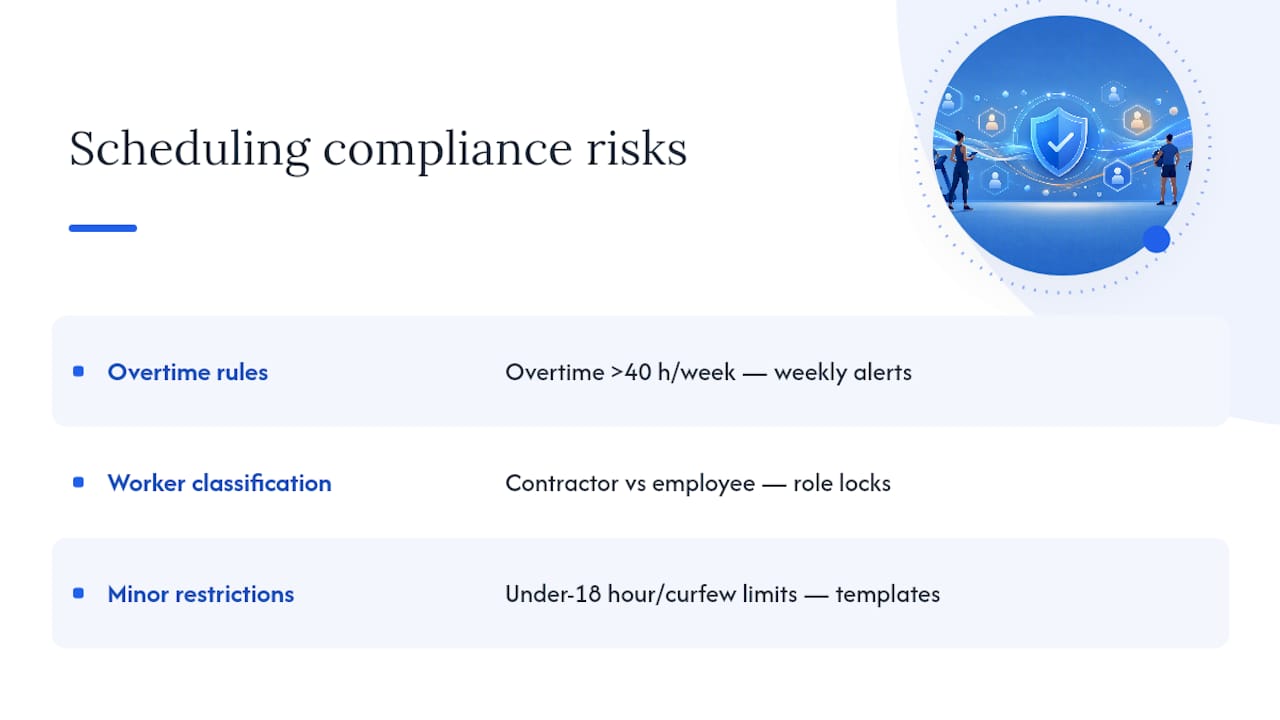
Overtime calculation is the most common trip-up. Federal wage and hour rules require overtime pay once a non-exempt employee crosses 40 hours in a workweek, and gyms that let front desk staff pick up extra shifts to cover a coworker's absence can cross that line without anyone noticing until the payroll report is already wrong. A weekly-hour alert inside your scheduling system catches this before it becomes a payroll correction.
Worker classification is the second landmine. Freelance trainers who set their own hours, bring their own equipment, and work with multiple gyms usually look like genuine independent contractors. A trainer who's required to follow a fixed schedule, use gym equipment exclusively, and take direction on how to run a session starts to look like an employee regardless of what the contract says. Misclassifying that person exposes a gym to back pay and penalty risk that dwarfs whatever was saved on payroll taxes.
Minor employment rules matter too if your front desk or childcare staff include workers under 18. Many states restrict how late a minor can work on a school night and cap total weekly hours, restrictions your scheduling templates need to respect automatically rather than relying on a manager to remember them.
None of this is a substitute for a conversation with an employment attorney familiar with your state's specific rules. But a system that flags overtime thresholds and locks in role-based eligibility gives you a paper trail if a classification or hours dispute ever comes up.
How Do You Staff for Seasonal Membership Swings?
Gym traffic isn't flat. January sign-ups spike group class demand for six to eight weeks before attrition sets back in, summer often pulls attendance down as members travel, and back-to-school season brings a second smaller surge in the fall. Scheduling around a flat average misses all three patterns and either overstaffs the slow months or leaves you scrambling during the surge.
Build seasonal templates instead of one static schedule. Keep a "peak season" template with extra front desk and instructor coverage ready to activate in early January, and a "low season" version with leaner coverage for the summer lull. Switching between saved templates takes minutes instead of rebuilding the whole roster from scratch every time attendance shifts.
Cross-train staff so the same person can cover front desk and assist with overflow classes during a surge. This gives you flex capacity without adding headcount for a demand spike that might only last two months.
Watch your booking calendar for early warning signs. A jump in class waitlists or a spike in new member sign-ups typically shows up one to two weeks before the staffing crunch actually hits, giving you time to activate the higher-coverage template before members start noticing overcrowded classes or long front desk lines.
Finally, keep a short list of on-call part-time or freelance staff who've already gone through your onboarding and system training. When a seasonal surge hits, you're activating existing shifts for people who already know the system, not scrambling to train someone new in the middle of your busiest month.
How Do You Notify Staff of Schedule Changes Fast?
A schedule change that doesn't reach the right person on time is worse than no schedule at all, because now someone shows up expecting a shift that's no longer theirs, or nobody shows up for one that still needs coverage.
Push notifications through a scheduling app beat group texts for one simple reason: they're tied to the specific shift, not a scrolling conversation. When a manager edits Tuesday's 6 a.m. shift, only the people on that shift, and whoever's picking it up, get pinged, instead of the entire staff wading through a chat thread to figure out if the change applies to them.
Automatic confirmations close the loop. A good notification system doesn't just send an alert, it tracks whether the staff member has actually seen and acknowledged the change, so a manager isn't left guessing whether a swap actually registered.
Layer your channels by urgency. Routine schedule publishing can go out as a standard app notification the night before. A same-day emergency, someone calling in sick an hour before opening, needs a more urgent channel like a push alert plus a text, so it doesn't sit unread in an app someone hasn't opened yet.
Keep the schedule itself as the single source of truth. If staff can check the live version on their phone at any moment, a missed notification becomes a minor inconvenience instead of a no-show. Automated notification tools built for this purpose handle the tiered urgency and confirmation tracking automatically, which matters more than it sounds once you're managing a staff of fifteen or more across multiple shifts.
Should Staff Scheduling Connect to Member Booking Systems?
Yes, and the reason is simpler than it sounds: a class schedule and a staffing schedule are really the same problem viewed from two angles. When they live in separate systems, someone has to manually keep them in sync, and that's exactly where gaps creep in.
When a member books the last spot in a 6 p.m. spin class, a connected system can flag whether the assigned instructor is confirmed for that slot, or whether the class needs a second staff member because attendance crossed a threshold. Without that link, a manager finds out about the capacity problem when members start complaining, not before.
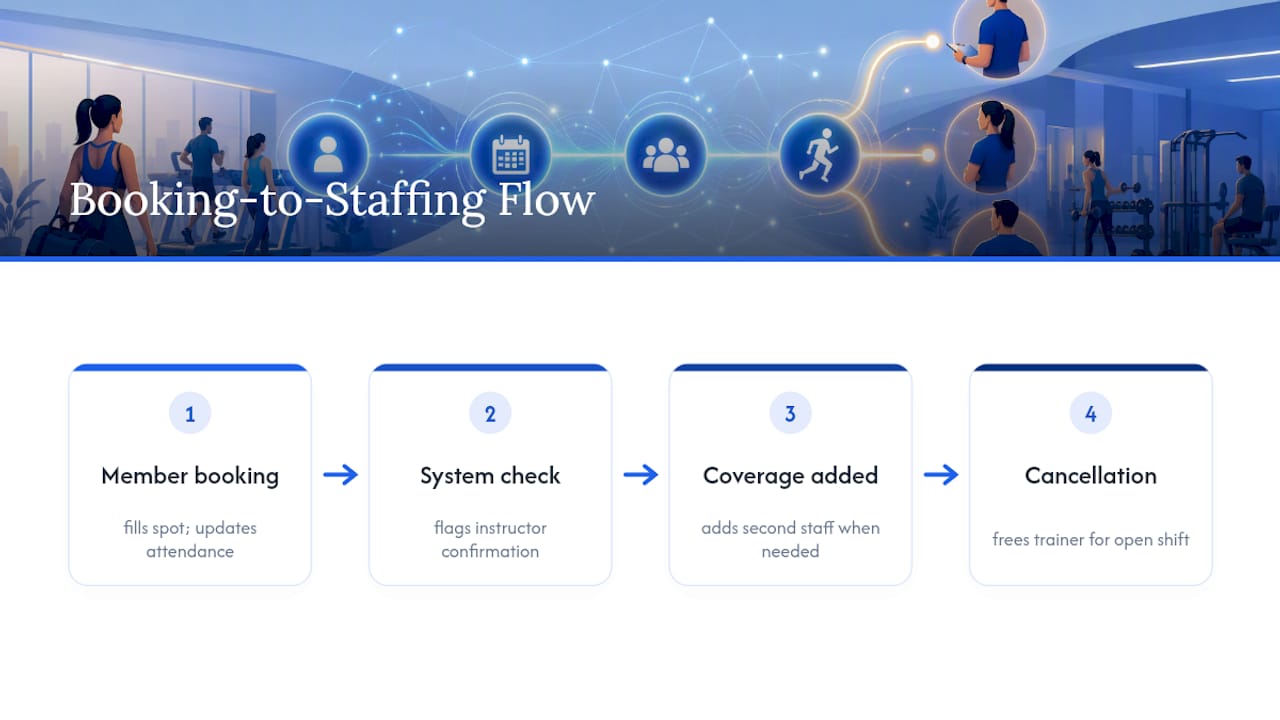
Booking data also feeds staffing decisions directly. If Thursday evening yoga consistently books out two days in advance while Tuesday's session runs half-empty, that's a signal to shift instructor hours toward Thursday and trim Tuesday's coverage, a pattern that's invisible if your booking system and your staffing system don't talk to each other.
Cancellations cut both ways too. When a member cancels a personal training session, a connected system can immediately free up that trainer for an open shift elsewhere, instead of leaving them idle on the books while another area of the gym is short-staffed. That single connection point, bookings talking to staffing in real time, is often the difference between a schedule that reacts to problems and one that prevents them.
What I'd Tell a Manager Rolling This Out for the First Time
Pilot this with one location or just your busiest shift block first, not the entire operation at once. Train the staff who'll actually use it before you flip the switch, and ask them directly what's confusing after week one.
Set modest goals for month one. A meaningful drop in coverage gaps and a few reclaimed hours of admin time is a real win. Don't expect a perfect schedule immediately.
Once time-tracking data starts accumulating, use it to make staffing calls. Numbers land better with staff than a manager's gut feeling ever will.
— Vedad
Get Your Gym's Schedule Running on Finegym
A dedicated gym management platform replaces the spreadsheet-and-group-chat approach with one system that actually connects the pieces: recurring shift templates, role-based assignments, mobile access for swap requests, class-linked scheduling for instructors, and a payroll export that keeps hours worked matched to hours paid.
Everything covered in this guide, weekly templates, manager-approved swaps, peak-window coverage planning, maps directly to features inside Finegym's gym management platform. If you want to see the staffing math before you commit to anything, run your current roster through the staff cost calculator to see where labor dollars are actually going. From there, the free gym management software tier lets you test the scheduling and mobile access features with your real staff and your real weekly grind, no long commitment required to find out if it fits how your gym actually runs.