

The correct approach to gym membership refunds is straightforward: enforce your written eligibility and proration rules inside your management software, process the refund through your integrated payment gateway, and record it as a gross contra-revenue entry rather than netting it against deposits. Policy, automation, and reconciliation work as one system. A platform like Finegym can run all three from a single dashboard.
TL;DR:
- Automate all refund steps, including calculation, processing, and account updates, to ensure consistency and reduce staff errors.
- Record refunds as gross contra-revenue entries and adjust deferred revenue accounts for partial plans, maintaining clear visibility in financials.
- Reconcile refunds regularly with five key reports to identify timing differences or fee mismatches before closing books.
- Write clear, rule-based refund policies with defined eligibility, proration methods, exceptions, and escalation thresholds to enable software enforcement.
- Track reasons for refunds and analyze trends over 30 to 90 days to detect operational issues early and improve dispute resolution.
Table of Contents
- What Is the Right Workflow for Processing Gym Membership Refunds?
- How Do You Reconcile Refunds to Bank Deposits Without Breaking Month-End Close?
- How Should You Write a Refund Policy That Software Can Actually Enforce?
- How Do You Automate Refund Logging and Track Trends Over Time?
- What Should You Do This Week to Start Managing Refunds Properly?
- What Consumer Protections Apply to Gym Membership Refunds?
- Why Do Members Actually Request Refunds?
- How Long Does a Gym Membership Refund Actually Take?
- What Happens When a Refund Request Is Denied or Delayed?
- Are a Refund, a Credit, and a Cancellation the Same Thing?
- Operator Perspective: What Automating Refunds Actually Changes
- How Finegym Handles Refund Workflows and Keeps Your Books Clean
- Sources
What Is the Right Workflow for Processing Gym Membership Refunds?
A refund request should never be a judgment call made at the front desk. It should follow the same five steps every time, regardless of who's on shift.
- Intake. Capture the request in writing (email, ticket, or in-app form), pull the member's attendance and payment history, and check both against your written policy. This is where most disputes start, so timestamp everything.
- Calculate proration. Figure out what's actually owed. A monthly membership canceled 10 days into a 30-day cycle owes roughly two-thirds of that month back. An annual plan needs unused-month math, not a flat percentage. A class pack refunds based on unused sessions, not elapsed calendar time. If a promotional discount applied to the original purchase, prorate against the discounted rate paid, not the list price.
- Process the payment. Initiate the refund through your integrated gateway rather than issuing a manual check or a side transfer. Note the processor's fee treatment and expected settlement window. Most card processors take three to ten business days to actually land the funds, even though your software will show the refund as "processed" immediately.
- Update accounts. Adjust the member's balance, apply a credit if the policy calls for one instead of cash back, and generate a refund invoice or receipt tied to the original transaction ID.
- Document the decision. Log a reason code, the approving manager's name, and any supporting evidence: a doctor's note, a screenshot of a duplicate charge, an email thread.
Automating steps two through four is where most operators see the fastest payoff. Automated refund invoicing lets your system detect a trigger event, calculate the prorated amount, generate the invoice, and update the member's account without a staffer opening a spreadsheet. That consistency alone cuts the back-and-forth that turns a five-minute refund into a three-day email chain. A tool like Finegym's membership management features can apply these rules automatically once they're configured.
How Do You Reconcile Refunds to Bank Deposits Without Breaking Month-End Close?
Refunds that get netted quietly against deposits are the fastest way to lose visibility into what's actually happening in your business. Bookkeepers who specialize in fitness businesses consistently recommend the opposite: record refunds as gross contra-revenue entries, broken out separately from sales tax and processing fees, so you can see refund volume and drivers at a glance instead of guessing from a shrinking deposit line.
There's a second layer most owners miss. If a member paid for an annual plan or a class pack up front, that revenue sits on your books as deferred revenue, recognized gradually as the member uses the service. A mid-term refund doesn't just reduce cash. It requires adjusting the deferred revenue rollforward to reflect the unused portion that's being returned, not a simple debit against whatever revenue got booked that month.
Every reconciliation cycle should pull the same five reports:
- Billing summary from your membership platform
- Payments actually collected during the period
- Refunds and chargebacks report, itemized by reason
- Processor settlement or payout report (Stripe, Square, or whichever gateway you use)
- Bank deposit records for the same window
Gyms that skip a monthly tie-out routine are far more likely to carry an unnoticed refund liability into their next close, since processor payouts are net of fees and refunds and often land on a delayed schedule relative to the original sale.
The actual tie-out is arithmetic, not mystery: gross billed minus refunds minus processing fees should equal the net payout, and the net payout should equal what actually hits the bank. When it doesn't, the gap is almost always a timing difference (a refund processed on the 29th settling in the following month) or a fee mismatch, not a missing dollar. Chase down the difference before you close the books, not after.
How Should You Write a Refund Policy That Software Can Actually Enforce?
A refund policy written for humans to interpret is a policy your software can't enforce, and inconsistent enforcement is what generates disputes in the first place. Every policy needs four defined elements before it goes into your system:
- Eligibility window: how many days after billing a member can request a refund, and whether that window resets on renewal.
- Proration method: time-based (days remaining in the cycle) or usage-based (sessions or classes remaining), stated explicitly per product type.
- Exceptions: medical documentation, relocation, or studio-initiated cancellations (a canceled class series, an instructor departure) that bypass the standard window.
- Escalation thresholds: the dollar amount or circumstance at which a request needs manager approval instead of automatic processing.
Once those four are defined in plain language, translating them into rule logic is mechanical. "Refund within 3 days of billing, full amount" becomes a rule: IF days_since_charge <= 3 THEN refund_percent = 100. "Prorate monthly membership by unused days" becomes refund_amount = (days_remaining / days_in_cycle) * amount_paid. Finegym's guide on prorating gym memberships with a daily rate formula walks through this exact calculation for monthly and annual products.
Pro Tip: Build your exceptions list before launch, not after the first disputed refund. Injury, relocation, and studio-canceled classes cover the overwhelming majority of exception requests. Get them into the rule set up front and you'll rarely need a manual override.
Consistent enforcement isn't just an efficiency play. When every member gets the same proration math for the same circumstance, you remove the "but you refunded my friend in full" conversation entirely, and that consistency reduces disputes and chargebacks because the policy stops looking arbitrary.
How Do You Automate Refund Logging and Track Trends Over Time?
A refund log is only useful if it captures the right fields and someone actually looks at it. At minimum, log the member's name, the product refunded, sessions or days used before the refund, the reason code, the approving manager, and a timestamp.
Reason codes matter more than most owners initially think. A generic "member requested refund" tells you nothing three months later. A code like INJURY, DUPLICATE_CHARGE, SCHEDULE_CONFLICT, or INSTRUCTOR_CANCELED lets you spot patterns before they become a trend that costs you real revenue.
Triage automation handles the volume so your staff handles the judgment calls. Small requests under a set threshold, say $50, can auto-approve against policy without a manager touching them. Larger or exception-flagged requests route to a manager queue automatically. This kind of setup can pull attendance history and draft a policy-compliant reply before a human ever opens the ticket, which is where most of the time savings actually come from.
| Analysis window | What to check | Why it matters |
|---|---|---|
| 30 days | Refund count by reason code | Catches a spike early (a bad instructor week, a billing glitch) |
| — | Refund rate by class type or product | Flags a specific offering that's underperforming |
| 90 days | Refund rate by instructor or location | Surfaces staffing or multi-location issues before renewal season |
Operators who analyze refund trends across 30 to 90 day windows by reason code catch problem patterns while they're still small and cheap to fix.
What Should You Do This Week to Start Managing Refunds Properly?
You don't need a six-month rollout to fix a messy refund process. Most of this can be live within days.
- Finalize your written policy (eligibility window, proration method, exceptions, thresholds).
- Configure proration rules inside your management software for each product type.
- Confirm your payment gateway is set to process refunds directly, not through a manual workaround.
- Build your refund log schema with the fields above.
- Set your manager-approval dollar threshold.
- Put the monthly reconciliation routine on a recurring calendar reminder.
Two templates make this easier to hand off:
- Auto-reply line: "Thanks for reaching out. Refunds are processed within [X] business days once we confirm eligibility against your membership terms."
- Reason-code starter list:
INJURY,RELOCATION,DUPLICATE_CHARGE,SCHEDULE_CONFLICT,INSTRUCTOR_CANCELED,BILLING_ERROR.
Ownership matters as much as process. Front desk staff handle intake and documentation. The operations manager owns policy exceptions and threshold approvals. The bookkeeper owns the monthly reconciliation. Splitting these three cleanly prevents the common failure mode where one overloaded manager becomes a bottleneck for every refund in the building.
What Consumer Protections Apply to Gym Membership Refunds?
Refund rights for gym members aren't uniform nationwide. Many states have specific health club or fitness-service statutes that govern cancellation rights, cooling-off periods, and refund timing, often layered on top of general consumer protection law. Some states mandate a short cancellation window (commonly three days) after signing a contract, during which a member can cancel and receive a full refund regardless of what the gym's own policy says.
Beyond state-specific rules, general consumer protection principles apply almost everywhere: a gym can't misrepresent what a membership includes, can't bill after a valid cancellation request, and typically must honor refund terms disclosed at the point of sale. If a studio's marketing promised something the membership didn't deliver, that's a separate legal exposure from a standard eligibility dispute.
The practical implication for operators is simple: your internal policy can be more generous than the law requires, but it can never be more restrictive than what your state mandates. Before finalizing eligibility windows and exceptions, check your state's specific health club or gym membership statute rather than assuming a generic 30-day policy covers you. This is also where documentation earns its keep. A clear paper trail (the signed contract, the disclosed policy, the timestamped cancellation request) is what protects a gym if a refund decision ever gets challenged formally rather than just disputed at the front desk.
Why Do Members Actually Request Refunds?
The reasons cluster into a handful of predictable categories, and knowing which one you're dealing with should shape both the response and the reason code you log.
Medical and injury-related requests are the most common exception category, and usually the most sympathetic. A member who can't physically use the gym anymore has a legitimate case regardless of what the standard cancellation window says.
Billing errors cover duplicate charges, incorrect proration on a plan change, or a charge that continued after a valid cancellation. These aren't really refund requests. They're corrections, and they should be flagged and processed differently than a discretionary refund.
Service dissatisfaction covers everything from "the class I signed up for got canceled" to "the equipment is always broken." These are the requests that benefit most from a clear exceptions policy, because handled inconsistently, they generate the most repeat friction.
Relocation or life change requests (a job move, a schedule change that makes the gym unusable) are common enough to deserve their own reason code rather than getting lumped into "other."
Duplicate or accidental sign-ups, particularly from online sign-up flows, generate a steady trickle of near-immediate refund requests that should almost always auto-approve.
Tracking which category drives your refund volume over a 90-day window tells you where to focus. A spike in service-dissatisfaction refunds points at an operational problem. A spike in billing-error refunds points at a software configuration problem.
How Long Does a Gym Membership Refund Actually Take?
The timeline has two separate clocks, and conflating them is where most member frustration comes from. The first clock is your internal decision time: how long it takes your staff to review the request, check it against policy, and approve or deny it. With automated triage handling straightforward cases, this can happen same-day. Exception cases routed to a manager typically take one to three business days.
The second clock starts once the refund is approved and belongs to your payment processor, not your software. Card refunds typically settle back to the member's account in three to ten business days, depending on the card network and the member's bank. Your management platform will usually show the refund as "processed" the moment it's submitted to the gateway, but that's not the same as the member seeing money back in their account. Setting that expectation explicitly (in your policy language and in your auto-reply template) heads off a predictable wave of "where's my refund" follow-ups.
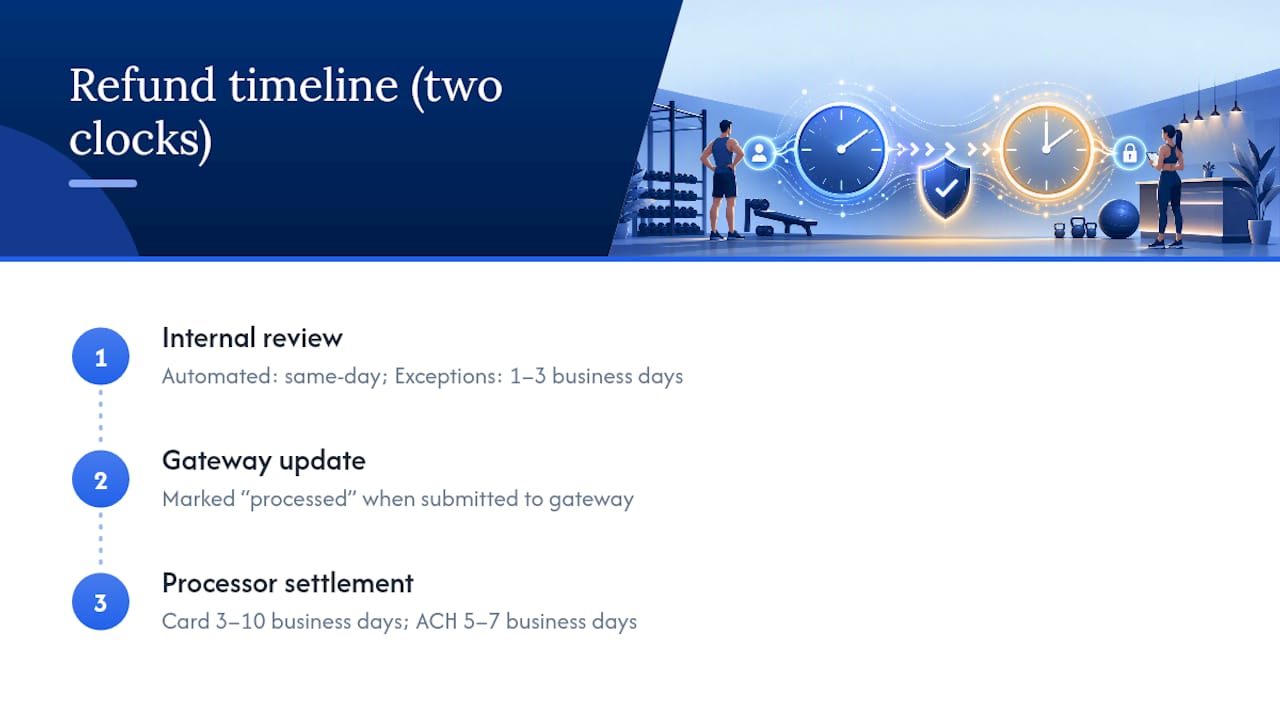
If a member paid by ACH or bank transfer instead of card, settlement windows run longer, sometimes five to seven business days just for the transaction to clear the banking network on top of your internal decision time. Building this into your written policy, rather than leaving it implied, is one of the simplest fixes available: state the internal review window and the separate processor settlement window as two distinct numbers, not one combined estimate.
What Happens When a Refund Request Is Denied or Delayed?
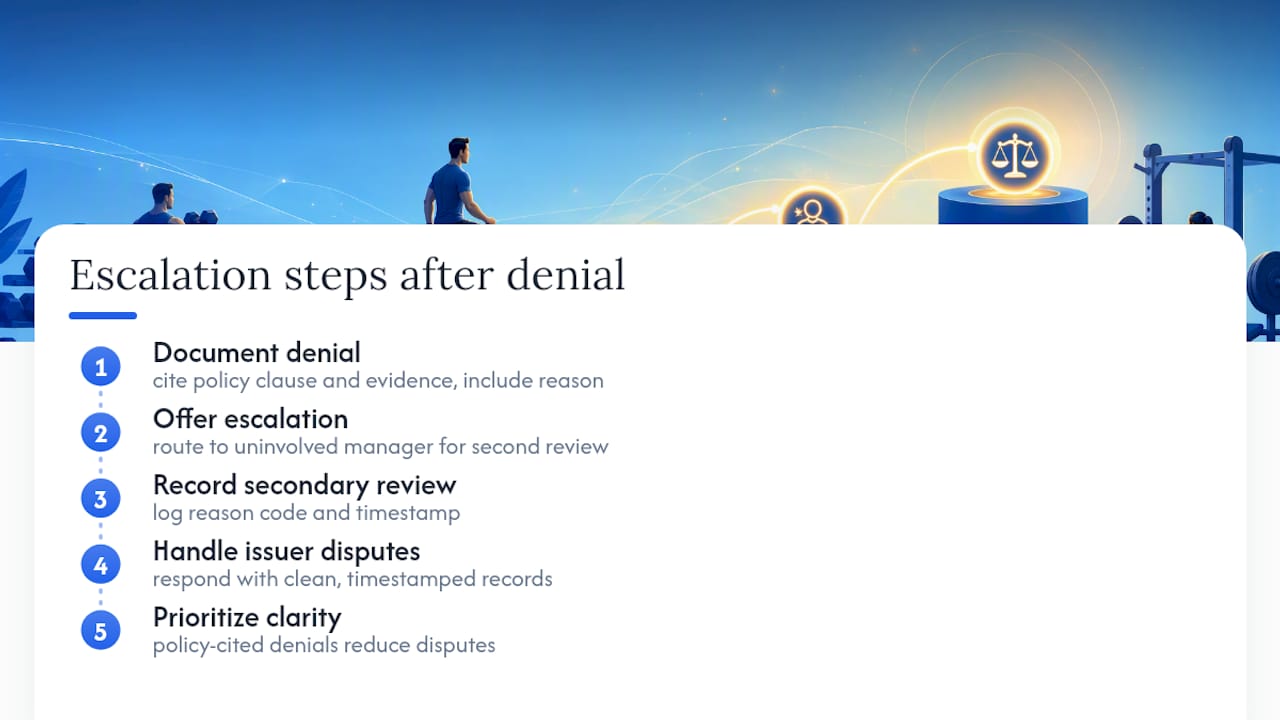
A denial isn't the end of the conversation if the member disagrees, and having a defined escalation path matters as much as the policy itself. The first step is always a documented explanation: exactly which policy clause the denial is based on, and what evidence was reviewed to reach that decision. Vague denials ("we can't do that") generate far more chargebacks than specific ones ("your cancellation request came 12 days after the eligibility window closed on [date]").
If the member escalates, route the request to a manager who wasn't part of the original decision, if your staffing allows it. A second set of eyes on borderline cases (a member with partial documentation, an edge-case timing dispute) often resolves the disagreement without further escalation. Document that secondary review the same way you document the original decision, with a reason code and timestamp.
When a member disputes the charge directly with their card issuer instead of going through your process, you're now in chargeback territory, which runs on the card network's timeline, not yours. Having a clean, timestamped record of the original request, the policy applied, and the decision made is exactly what you need to respond to that dispute. Finegym's guide on preventing and disputing chargebacks covers the documentation standards that actually hold up in a formal dispute.
The pattern worth remembering: most escalations aren't really about the money. They're about the member feeling like the decision was arbitrary. A documented, policy-cited denial resolves far more disputes than a generous-but-unexplained one.
Are a Refund, a Credit, and a Cancellation the Same Thing?
No, and treating them interchangeably is where a lot of billing confusion starts. Each one has a different accounting treatment and a different member experience, and your policy should name all three explicitly.
A cancellation stops future billing. It doesn't return any money already paid unless a refund is separately approved for it. A member who cancels mid-cycle typically finishes out access through the period they already paid for.
A refund returns money, either fully or prorated, and reduces recognized revenue. It's the only one of the three that touches your bank balance and requires the contra-revenue accounting treatment covered earlier.
A credit keeps the money inside your business but applies it toward a future charge, a session, a different membership tier. Credits don't touch cash or immediately affect revenue recognition the way a refund does, but they still need to be tracked as a liability until they're used or expired.
The distinction matters operationally because a lot of disputes resolve more easily as credits than as refunds. A member unhappy about a canceled class series might be perfectly satisfied with a credit toward next month, which costs you nothing in processing fees or cash flow, and it's worth training front desk staff to offer that option before defaulting straight to a cash refund.
Operator Perspective: What Automating Refunds Actually Changes
The pitfalls are predictable: mismatched attendance records, third-party booking platforms that don't sync cleanly, and exception cases nobody wrote a rule for. None of that gets solved by better intentions. It gets solved by tighter rule definitions and a log that catches the edge cases you missed the first time.
The real payoff isn't sped alone. It's fewer disputes and a month-end close that actually ties out. Track two numbers over 90 days: average refund processing time and refund rate by reason code. If both aren't trending down, your policy needs revision, not more automation.
— Vedad
How Finegym Handles Refund Workflows and Keeps Your Books Clean
Finegym gives operators one place to run every step covered above instead of stitching together a payment gateway, a spreadsheet, and a separate bookkeeping tool. Proration rules live inside the platform, so a monthly, annual, or class-pack refund calculates itself against the policy you define, not against whatever a staffer remembers from last time.

Refunds process through Finegym's integrated payments and invoicing, with each transaction automatically logged against a reason code, an approver, and a timestamp, giving you the exact refund log structure that supports 90-day trend analysis without extra spreadsheet work. Automated notifications keep members informed of status without a staffer manually replying to every ticket, and the underlying reports are built for reconciliation, not just billing display, so tying platform data to processor settlements and bank deposits is a monthly routine instead of a monthly headache.
Setup and data migration are built to handle everything from a single studio to a multi-location franchise. If your current refund process is spread across three tools and a shared inbox, explore Finegym's gym management platform and see what a single system for policy, payments, and reporting actually looks like.
Sources
The workflow and accounting guidance in this article draws on operational research from fitness bookkeeping and billing specialists. ReliaBills covers how refund invoice automation standardizes calculations and documentation. Peacock Bookkeeping Services outlines deferred revenue treatment and reconciliation practices specific to gym owners. Hyman Financial details the monthly report pull needed to tie gross billed amounts to bank deposits. Starch breaks down triage automation for fitness studio founders, and Beancount.io explains deferred revenue journal entries for prepaid memberships and class packs.
For operators managing refund trends alongside broader member retention, Baby Love Growth's retention strategies guide offers useful context on reducing churn that drives refund requests in the first place.
- How Gyms Use Refund Invoice Automation | ReliaBills
- Gym Bookkeeping Services: What Owners Actually Need | Peacock Bookkeeping Services
- Streamlined Bookkeeping for Fitness Businesses: Achieving Financial Clarity
- Refunds and returns for fitness founders | Starch
- Beancount