

The setting that determines whether you prorate gym memberships correctly is your billing-day option: charge on signup date versus a fixed monthly billing day. Check that toggle before you launch any new plan, because it decides whether members owe a partial charge, get a credit, or start clean. FineGym.io, for example, lets you configure prorated first payments automatically when a plan uses a fixed billing day, which removes the manual math entirely.
TL;DR:
- Prorating depends heavily on whether your billing system charges on signup or on a fixed monthly day, affecting how partial periods are calculated.
- Daily-rate proration divides the monthly fee by days in the billing cycle, multiplying by used or remaining days to determine accurate charges.
- Configuring proration settings before launching a plan is critical, as most platforms lock these options after creation, requiring a new plan for changes.
- Communicating prorated charges clearly before billing and documenting member consent helps prevent disputes and maintains trust.
- Running test cases for mid-cycle signups, cancellations, holds, and plan upgrades ensures your system calculates charges correctly before going live.
Table of Contents
- What Does Prorating Mean in Gym-Management Software?
- How Do You Calculate a Prorated Gym Membership Charge?
- Configuration Checklist Before You Launch a New Membership Plan
- Handling Freezes, Cancellations, and Plan Changes Correctly
- Test Cases to Run Before You Go Live
- Why Proration Clarity Keeps Members Happy
- Legal and Compliance Basics for Prorated Billing
- Publisher perspective: why proration discipline pays for itself
- Get Prorated Billing Right From Day One With Finegym
- Sources
What Does Prorating Mean in Gym-Management Software?
Prorating adjusts a membership charge to reflect a partial billing period instead of a full one. In practice, gym-management platforms apply this logic at four moments: the first payment after signup, a hold or freeze, a cancellation, and a plan upgrade or downgrade. Each of these triggers different math depending on how your software is configured, which is why two gyms running the same monthly fee can produce completely different invoices for a member who joins on the 17th.
The core distinction is between "charge on signup" billing and "fixed billing day" billing. Charge-on-signup systems bill members the full amount the day they join, then renew on that same date every cycle. There is no proration because every cycle is a full cycle. Fixed billing day systems, by contrast, sync every member to a single date, like the 1st of the month, so accounting and reporting stay consistent. That syncing is exactly what creates a partial first period, and that partial period is what gets prorated.
Whether the system issues a charge or a credit depends on direction. A mid-cycle upgrade typically triggers a prorated charge for the difference. A mid-cycle cancellation or downgrade typically triggers a prorated credit. Most platforms handle this with one of a few standard approaches:
- Daily-rate proration, dividing the monthly fee by days in the period
- Session-count proration, for packages sold by number of visits rather than time
- Rounding to the nearest dollar or half-dollar to avoid fractional-cent charges
- Minimum-charge floors that prevent a $0.42 invoice from ever generating
Aligning members to a fixed billing day also simplifies your accounting close. When every active member renews on the same date, reconciling a monthly report against your merchant statement takes minutes instead of a member-by-member audit.
How Do You Calculate a Prorated Gym Membership Charge?
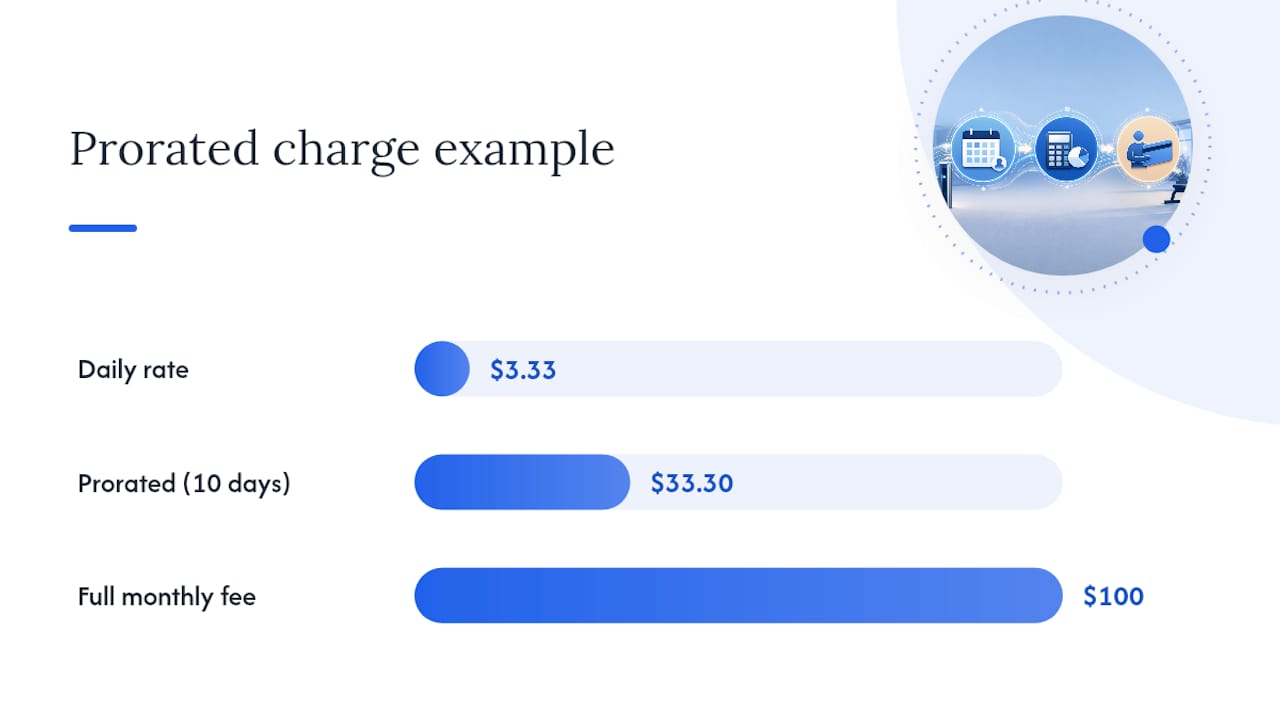
The daily-rate formula is the industry baseline, and it's the one you should use to spot-check whatever your software outputs. It divides the monthly fee by the number of days in the billing period, then multiplies by the days the member actually used.
- Find the daily rate: monthly fee ÷ days in the billing period.
- Multiply the daily rate by the number of days remaining in the current cycle.
- Round according to your platform's policy (nearest cent, nearest dollar, or a fixed minimum).
Take a $100 monthly plan on a 30-day cycle, with a member joining on day 21. The daily rate is $100 ÷ 30 = $3.33. The member owes 10 remaining days at $3.33, or $33.30, prorated for that first partial month before the full $100 kicks in on the next cycle.
Some software rounds to the nearest week instead of the day, which is simpler to explain to members but less exact. Weekly rounding tends to overcharge or undercharge by a few dollars depending on where the join date falls, and gyms that prioritize precision generally stick with daily rates.
Session-count plans work differently. A 10-session package sold mid-cycle isn't prorated by day. It's prorated by session, and most systems round partial sessions up rather than issuing fractional credits. Unlimited plans, by contrast, almost always use the daily-rate method since there's no session count to reference.
Pro Tip: Run the daily-rate formula by hand on your three most common plan prices once a quarter. If your software's output drifts from your manual calculation by more than a rounding cent, something in your configuration changed without your noticing.
Rounding policy matters more than most operators expect. A gym that rounds every prorated charge down to protect member goodwill will bleed a small amount of revenue across hundreds of signups every month, while a gym that rounds up risks member complaints and disputes over pennies that feel unfair even when they're accurate.
Configuration Checklist Before You Launch a New Membership Plan
Get this right once, because many platforms lock the core settings after a plan goes live. FineGym.io's own membership plan documentation is explicit about this: billing interval and billing day option cannot be changed after plan creation, since that protects the terms existing members already agreed to.
Work through this before you hit save on any new plan:
- Confirm the billing interval (monthly, quarterly, annual) and whether it uses a fixed day or charge-on-signup.
- Set proration defaults separately for first payment, final payment, cancellations, and holds.
- Choose the proration type: daily, weekly, session-count, or a flat percentage of the membership fee.
- Decide your rounding policy and any minimum charge threshold.
- Define your freeze and hold policy: maximum duration, freeze fee if any, notice period required, and whether reactivation is automatic or manual.
- Document how you capture member consent for these terms, since that record is your best defense if a charge is ever disputed.
Because billing interval and set day are locked after creation, changing them typically means building a new membership plan and migrating existing members over, not editing the plan in place. That migration touches your reporting history, your renewal dates, and potentially your Stripe or payment-processor records, so it's worth treating as a project rather than a quick fix. If you inherited a gym's existing software setup, this is the first thing worth auditing: pull up every active plan and verify the billing-day option and proration toggles match what you'd choose if you were building it today.
Pro Tip: Before you migrate a group of members to a new plan structure, export a snapshot of their current billing dates and balances. If the migration goes sideways, that snapshot is the only clean reference you'll have to rebuild from.
Handling Freezes, Cancellations, and Plan Changes Correctly
Edge cases are where proration policies either hold up or fall apart. A freeze, a mid-cycle cancellation, or an upgrade request each demands a clear, pre-written rule, not an improvised decision from whoever answers the front desk that day.
- Freezes and holds: decide upfront whether a hold carries a maintenance fee, cap the maximum hold duration (a typical range), and set whether the membership auto-resumes billing on a fixed date or requires the member to reactivate manually.
- Mid-cycle cancellations: pick one rule and apply it consistently, either a prorated credit toward the final invoice or no refund for days already billed. Inconsistent application across members is what triggers complaints and, eventually, chargebacks.
- Upgrades and downgrades: charge the prorated difference for the remaining days on an upgrade, and issue a prorated credit toward the new lower plan on a downgrade.
- Dispute prevention: capture digital consent at signup and at every plan change, and keep an audit log of every billing adjustment tied to a member's account.
The single biggest driver of avoidable chargebacks is a freeze without a documented end date. Signed digital freeze agreements with explicit resume dates, paired with an automated reactivation workflow, close most of that gap before it becomes a cardholder dispute.
Test Cases to Run Before You Go Live
Don't trust a new proration configuration until you've run it through a deliberate test matrix. This matters more than it sounds, because a formula that looks right on paper can still produce the wrong invoice once holds, discounts, and tax rules interact inside the actual software.
- Sign up a test member mid-cycle and confirm the prorated first charge matches your manual daily-rate calculation.
- Cancel a test membership mid-cycle and verify the credit or non-refund behavior matches your written policy.
- Freeze and reactivate a test account, checking that the next billing date lands where you expect.
- Upgrade and downgrade a test plan, confirming the prorated adjustment charges or credits the correct amount.
- Export the accounting report for all four scenarios and confirm the numbers reconcile with your processor statement.
Roll changes out to a small pilot group first, watch for disputes or confused support tickets over two or three billing cycles, then extend the configuration to your full membership base.
Why Proration Clarity Keeps Members Happy
Members rarely complain about being charged. They complain about being surprised. A $33.30 partial-month charge that shows up unexplained on a bank statement generates far more support tickets and disputes than the same charge paired with a clear line-item receipt that says "prorated: 10 days at $3.33/day."
The fix isn't complicated, but it does require discipline. Every prorated invoice, whether it's a first payment, a plan change, or a post-freeze reactivation, should show the calculation, not just the total. A member who sees "$100 monthly fee, prorated for 10 remaining days" trusts the charge even if they don't fully understand the math behind it. A member who sees only "$33.30" and no context assumes an error and calls the front desk.
Communication timing matters as much as the receipt itself. Send a notice before the first prorated charge hits, not after, especially for members who joined through a promotion or a referral where the sign-up flow moved quickly. A short automated email or app notification explaining "your first payment will be prorated based on your join date" heads off a huge share of confused calls before they happen.
The gyms that get the fewest billing complaints tend to share one habit: they treat the prorated first invoice as a trust-building moment, not an administrative afterthought. Get that first charge explained clearly, and members extend the benefit of the doubt to every renewal after it.
Legal and Compliance Basics for Prorated Billing
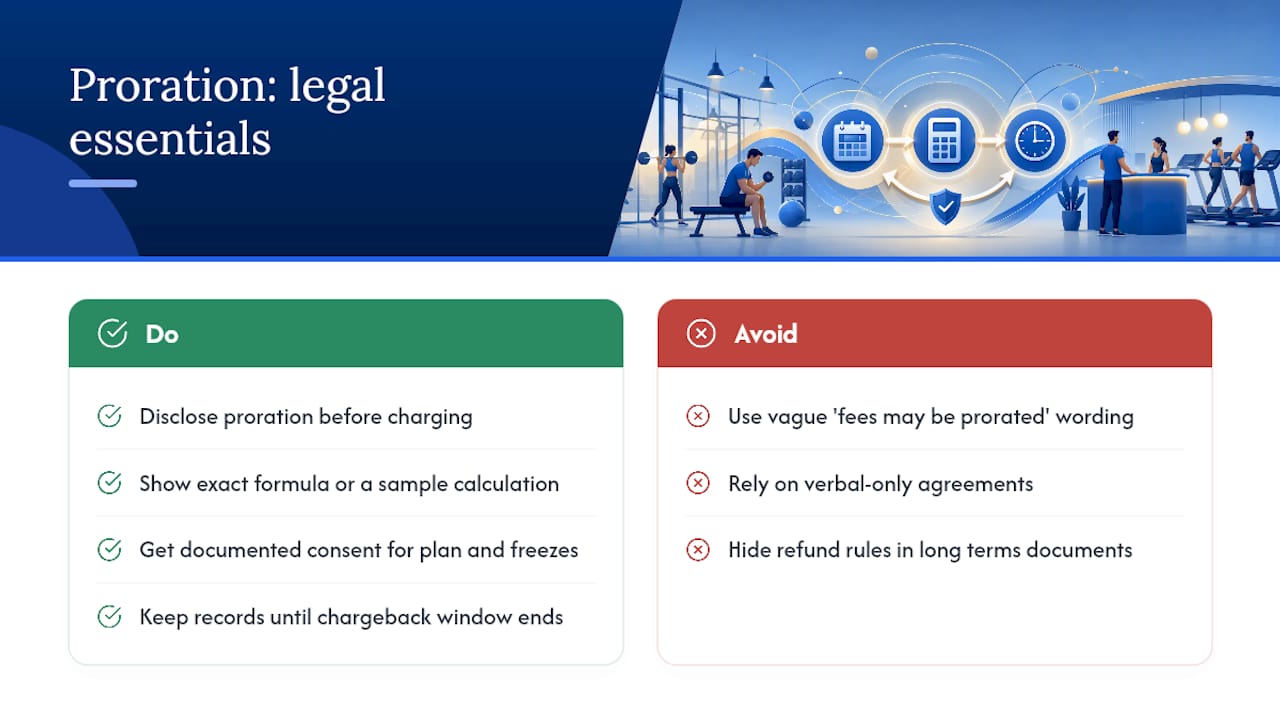
Consumer protection expectations around recurring billing generally come down to one principle: members must be able to understand what they're being charged and why, before the charge happens. Fixed billing day systems that generate a prorated first payment need to disclose that proration clearly at signup, ideally with the exact formula or a sample calculation, not just a vague mention that "fees may be prorated."
Consent documentation is your strongest protection if a member disputes a charge with their card issuer. A signed or digitally captured agreement that specifies the billing day, the proration method, and the cancellation and freeze terms gives you a paper trail that most chargeback processes require to rule in the merchant's favor. This matters just as much for a freeze agreement as it does for the original membership contract. Neither should be handled with a verbal confirmation alone.
Refund and cancellation policies also need to be stated in plain language, not buried in a lengthy terms document a member never reads. If your gym's policy is "no refund for the current billing period, prorated credit toward the next," that sentence should appear in the signup flow itself, not only in a PDF attached to a welcome email.
None of this is a substitute for reviewing your specific contract language and consent flows against the rules that apply in your jurisdiction. But operationally, the pattern that keeps gyms out of trouble is consistent: disclose the proration method before charging it, get documented consent for every plan and freeze, and keep those records accessible for as long as your merchant processor's chargeback window requires.
Publisher perspective: why proration discipline pays for itself
Correctly configured proration is one of the highest-leverage settings in your entire billing stack, and it's also one of the most neglected. Automated billing with clear proration defaults cuts staff time spent manually adjusting invoices and shrinks the volume of disputes reaching your front desk. FineGym.io's automated billing, configurable prorated first payments, and data migration support exist precisely because operators keep hitting this same wall. Run the checklist. Test before you launch. It's cheaper than fixing it after 200 members are already billed wrong.
— Vedad
Get Prorated Billing Right From Day One With Finegym
Finegym is the alternative to spreadsheet math and manual invoice adjustments for prorating gym memberships. Instead of calculating daily rates by hand every time someone joins mid-cycle, you configure billing-day options once, and the platform handles prorated first payments automatically.

The platform's membership management tools let you set proration type, rounding rules, and freeze policies directly in the plan builder, while built-in Stripe integration through payments and invoicing keeps prorated charges, credits, and refunds reconciled without a separate spreadsheet. Data migration support means switching from a legacy system doesn't mean re-entering every member's billing history by hand. If you're currently patching together proration with manual formulas, explore Finegym's gym management platform and see how the configuration checklist above maps directly onto the admin screens you'd actually use.