
A compliant cancellation process stops billing the moment a member requests it, logs that request automatically, and lets the member cancel through the same channel they used to sign up. That last part is the one most gyms still get wrong. Here's what to fix first:
- Add single-click online cancellation that matches the simplicity of your online sign-up flow.
- Make cancellation stop billing and access immediately, not after a call, meeting, or waiting period.
- Update your agreements and checkout screens so auto-renewal terms and cancellation steps are impossible to miss.
This is the practical core of the FTC Click-to-Cancel Rule, and it now shapes how every gym running on a platform like FineGym.io needs to configure billing and member status. Retention still matters. IHRSA data has long shown that member churn is one of the biggest threats to club profitability, but chasing retention by making cancellation hard is the exact practice regulators are now targeting.
Key Takeaways
A compliant membership cancellation process stops billing instantly, mirrors the sign-up channel, and documents every step for audit purposes.
| Point | Details |
|---|---|
| Process first, offer second | Cancel the membership immediately, then present retention offers, never before. |
| Match sign-up simplicity | Online cancellation must take one action, not a multi-step form or forced call. |
| Capture full audit metadata | Log timestamps, agent ID, reason code, and confirmation ID for every cancellation. |
| Separate auto-billing consent | Use a standalone checkbox for recurring charges, distinct from general terms. |
| Use FineGym for status control | FineGym separates freeze and cancel states and logs each cancellation automatically. |
Table of Contents
- What Does a Compliant Cancellation Workflow Look Like?
- What Does FTC Click-to-Cancel Actually Require?
- What Language Needs to Change in Agreements and Checkout?
- How Should Staff Handle Cancellation Requests?
- How Long Does Compliant Implementation Take?
- How Do You Test and Prove Compliance?
- How Can FineGym.io Support Your Cancellation Workflow?
- Frequently Asked Questions
- Sources
What Does a Compliant Cancellation Workflow Look Like?
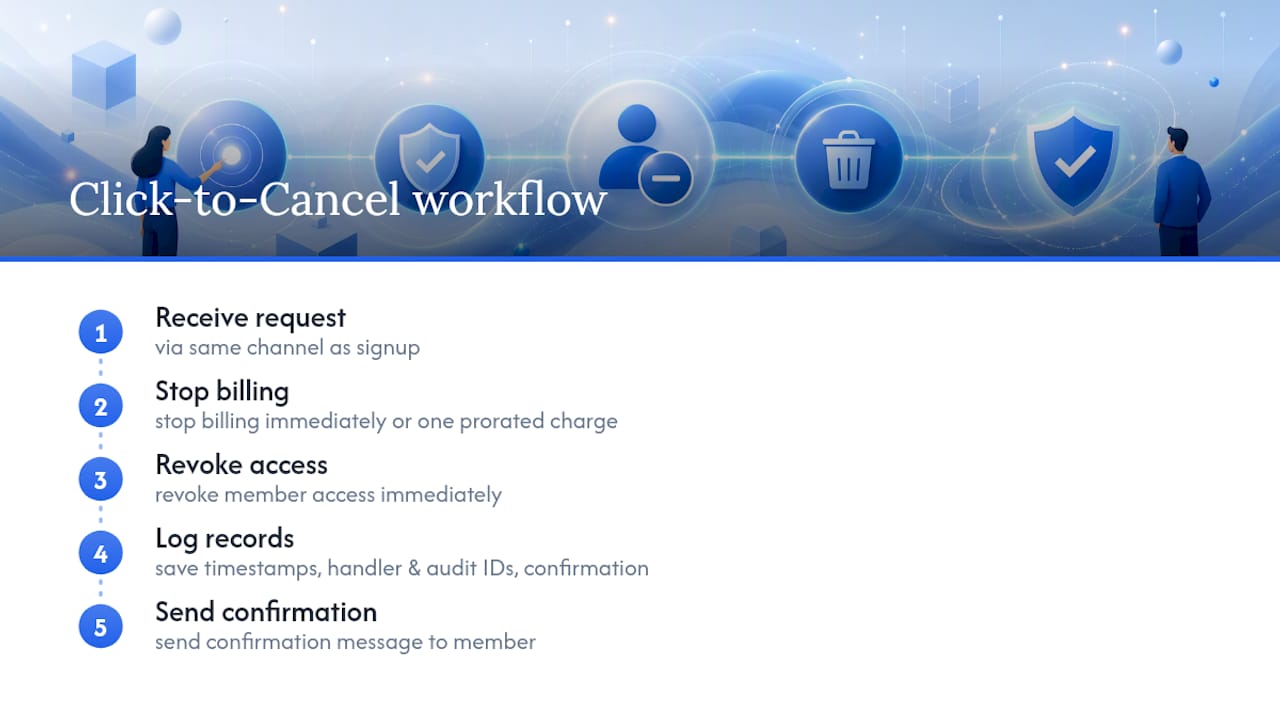
Inside your gym-management system, cancellation isn't one button. It's a sequence, and each step needs to happen in the right order to stay compliant and keep your records clean.
- Intercept the request the moment a member submits it, whether through the member portal, app, or front desk.
- Validate identity against the member record to prevent fraudulent cancellations.
- Set a "pending cancellation" status if you run save-play automation, but don't let this delay the actual cancellation.
- Stop billing immediately, or schedule the final prorated charge if your policy allows it.
- Revoke access, disabling QR check-ins and class booking rights tied to that plan.
- Log the reason and metadata tied to the request.
- Send a confirmation by email or SMS within minutes, not days.
For step 6, capture enough detail to survive an audit and to actually learn something. That means: member ID, request timestamp, channel used (app, portal, front desk), staff or system ID that processed it, reason code, any retention offer shown, and proof that billing consent was terminated.
Your confirmation message needs four things every time: a clear statement that billing has stopped, the effective date, what happens next (final charge, access end date), and a way to reach support if something looks wrong. Attach an audit ID to that message so both you and the member have a paper trail.
Pro Tip: Configure a "pending cancellation" status if you want to run a save offer, but wire it so the offer never blocks the cancellation itself. FineGym's membership management tools let you separate the "member has canceled" state from the "we're trying to win them back" state, so compliance and retention don't fight each other.
What Does FTC Click-to-Cancel Actually Require?
The rule is straightforward, and it removes most of the gray area gyms used to operate in. If a member can sign up online, they must be able to cancel online with equal simplicity. No phone call requirement. No mandatory in-person visit. No exit interview standing between the member and a processed cancellation.
Your compliance checklist should include:
- The cancellation channel mirrors the sign-up channel (online in, online out).
- Cancellation takes a single action, not a multi-page form.
- Processing happens immediately, not "within 3 to 5 business days."
- Renewal terms and pricing are disclosed clearly before the member commits.
- Automatic billing has its own separate consent checkbox, not bundled into general terms.
- The cancellation link or flow is easy to find, not hidden three menus deep.
And a short list of what not to do:
- Don't require an exit interview before processing the cancellation.
- Don't bury the cancel option inside settings, chat, or a support ticket queue.
- Don't make cancellation contingent on hearing a retention offer first.
The federal standard is blunt about this: cancellations must be processed without forcing a call or an exit interview, and the Click-to-Cancel guidance treats "same simplicity as sign-up" as the baseline, not an aspiration.
What Language Needs to Change in Agreements and Checkout?
Most membership agreements were written for a world where cancellation friction was a retention tool. That world is over. Here's the shift.
Before: "Membership renews automatically unless canceled in writing 30 days prior, submitted to the front desk during business hours."
After: "Your membership renews automatically at $XX/month. Cancel anytime online at [link], effective immediately upon confirmation."
Checkout needs its own explicit line for recurring billing, separate from the general terms checkbox: "I agree to be charged $XX/month automatically until I cancel." One line, one purpose, nothing bundled underneath it.
Your checkout and member portal disclosures should state:
- The exact cost and billing frequency.
- How to cancel, in plain language, with a direct link.
- Any notice period or fee tied to cancellation, if one legitimately applies.
- A visible link to the actual online cancellation flow, not a "contact us" dead end.
Separate consent for automatic charges isn't a nice-to-have anymore. It's the line auditors will check first.
How Should Staff Handle Cancellation Requests?
Staff training determines whether your policy on paper matches what actually happens at the front desk. The rule is simple: process first, offer second. Never the other way around.
A short script for front-desk or phone staff:
"I'll process that cancellation right now so it's confirmed today. Before you go, would you be open to hearing about a pause option or a discounted rate instead?"
Notice the order. The cancellation is already moving before the retention pitch starts.
Your training checklist should cover:
- How to process a cancellation in FineGym's member operations without leaving it in a pending state.
- How to log a retention offer and its outcome, accepted or declined.
- What counts as required audit documentation for every interaction.
Flag anything unusual for a manager: a member disputing charges after cancellation, a refund request beyond stated policy, or repeated cancel-and-rejoin patterns that suggest fraud.
Retention outreach only works when it comes after processing, not instead of it. Staff who delay cancellation to "save the sale" create legal exposure, not loyalty.
How Long Does Compliant Implementation Take?
Most gyms can reach baseline compliance faster than they expect, especially if their SaaS already supports status changes and automated billing rules.
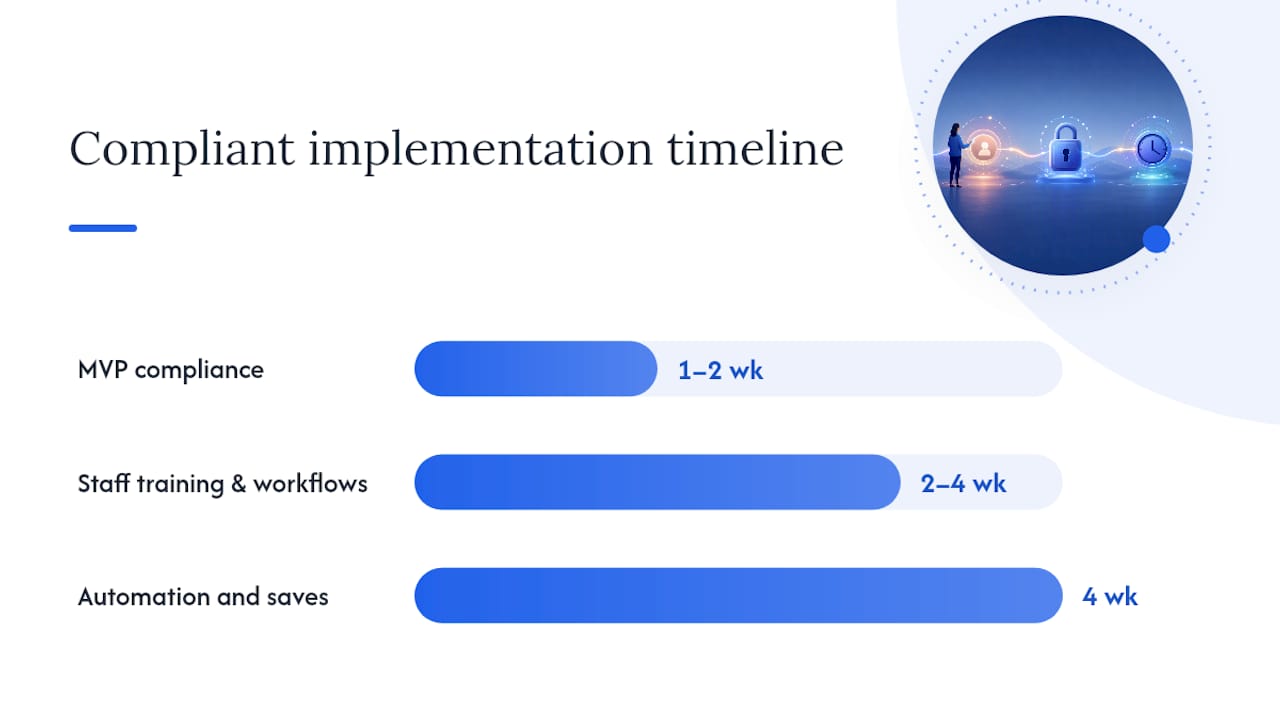
| Phase | Timeline | What's Included |
|---|---|---|
| MVP compliance | 1–2 weeks | Online cancel button, immediate billing stop, confirmation email |
| Staff training and workflows | 2–4 weeks | Scripts, escalation rules, audit logging habits |
| Automation and saves | 4 weeks | Pending-cancellation states, survey routing, win-back sequences |
Cost depends heavily on how much configuration versus custom development your system needs:
- Internal configuration hours for status rules, disclosures, and confirmation templates.
- Third-party integration or consultant time if you're connecting payment processors or CRM tools.
- Staff time for testing and training sessions.
- Possible tier upgrades if your current software subscription doesn't include automated cancellation workflows.
Prioritize in this order: stop billing and confirm first, mirror the sign-up path second, fix disclosures and checkout third, add automated saves and QA last. A cancellation-save automation that surveys the reason and routes a targeted offer can recover a meaningful share of at-risk members, but it belongs at the end of your rollout, not the beginning.
How Do You Test and Prove Compliance?
Testing needs to happen before an auditor or a complaint forces the issue.
Run these QA checks:
- Sign up as a test member through every channel you offer, then cancel through the same channel.
- Confirm billing stops the same day the cancellation is processed.
- Verify the confirmation email or SMS actually arrives and contains the right details.
- Try to trigger a retention offer mid-cancellation and confirm it never blocks completion.
Track these metrics on an ongoing basis:
- Average cancellation processing time.
- Percentage of cancellations completed online versus by phone or in person.
- Retention-offer acceptance rate.
- Failed or stalled cancellation incidents.
Keep these fields on record for every cancellation: request timestamp, processing timestamp, the agent or system ID that handled it, a confirmation audit ID, and a stored copy of the confirmation sent to the member. If a dispute ever surfaces, this is what settles it.
Why Easy Cancellation Is Good Business, Not Just Good Compliance
Gyms have spent years treating cancellation friction as a retention strategy. The data on churn suggests that's backward: members who feel trapped don't refer friends, don't upgrade, and leave worse reviews on the way out. A process-first cancellation flow, paired with freeze options and honest retention offers, protects revenue better than a hidden cancel button ever did. FineGym's status controls and audit logs make that trade easier to execute than it sounds on paper.
How Can FineGym.io Support Your Cancellation Workflow?
FineGym is built around the exact sequence this guide describes, not bolted onto it after the fact. Freeze and cancel are separate, configurable statuses. Canceling a membership stops billing, revokes check-in access, and keeps a permanent record in member history automatically, with no manual cleanup required.
Every cancellation generates an audit trail and a receipt without a staff member needing to remember the step. You can configure a pending-cancellation state to run a save offer without it ever delaying the actual cancellation, which is exactly the balance Click-to-Cancel compliance demands. Notifications, billing rules, and member status all live in one platform instead of three disconnected tools.
If you're auditing your current setup against this checklist, the fastest way to see the gaps is to look at your own feature configuration side by side with what compliance requires. Request a demo to walk through your cancellation flow and see where FineGym closes those gaps.
Frequently Asked Questions
What is the membership cancellation process under Click-to-Cancel rules? It's the sequence your gym-management system follows to end a membership: receive the request, stop billing immediately, revoke access, log the details, and send a confirmation, all through a channel as simple as the one used to sign up.
Can staff require a call before processing a cancellation? No. The Click-to-Cancel rule prohibits forcing a phone call, in-person visit, or exit interview before a cancellation is processed.
What's the difference between freezing and canceling a membership? A freeze pauses billing and access temporarily, often with an auto-resume date. A cancellation ends the membership permanently, stops billing, and revokes access while keeping the record in history.
How fast should billing stop after a cancellation request? Immediately, or with a single final prorated charge if your policy states one. Delayed processing is one of the most common compliance failures gyms run into.
What records should a gym keep after processing a cancellation? Request timestamp, processing timestamp, the staff or system ID that handled it, an audit confirmation ID, and a saved copy of the confirmation message sent to the member.
This article is general information, not a substitute for advice from a qualified lawyer. Consult a qualified legal professional about your own circumstances before acting on anything here.
Sources
- The FTC Click-to-Cancel Rule: What Gym Owners Need to Know - Two-Brain Business
- Automate Gym Cancellation Saves, Keep Members Guide - US Tech Automations