Complete Guide to Gym Management Software: Features, Selection & Implementation
A comprehensive guide to gym management software, covering essential features, selection criteria, and implementation tips for fitness businesses.

13 min de leitura
Important Note: This article provides general information about gym management software features and selection criteria. Finegym offers a comprehensive suite of tools for gym management. For the most up-to-date information on Finegym's specific features, capabilities, and how it can be tailored to your business, please contact our team or get started for free. This article is meant to be informational.
Running a gym or fitness center is no small feat. Between managing memberships, class schedules, staff, and billing, fitness entrepreneurs are often left with little time to focus on growing their business. That's where gym management software comes in.
This guide will explore everything you need to know about gym management software—from its essential features and the benefits it offers to how you can select the best solution for your needs and successfully implement it in your fitness business. For specialized guidance on fitness studio operations, see our software solutions for fitness studios guide. By the end, you'll have insights to help streamline your operations and grow your gym business.
What is Gym Management Software?
Gym management software is an all-in-one solution designed to help fitness business owners efficiently run their operations. It integrates various functionalities such as member management, scheduling, billing, reporting, and marketing into a single platform.
With the fitness software market projected to grow, choosing the right gym management system is an important business decision. Modern solutions like Finegym combine administrative tools with reporting features and a dedicated member mobile app to help you manage your business more effectively.
Key Features of Gym Management Software
Whether you're running a boutique fitness studio, a large gym, or a specialized training center, gym management systems come with features designed to help you manage your business. Here are the key features you should look for:
1. Membership Management
Gym membership software helps manage sign-ups, renewals, and cancellations. It allows you to track member details, manage contracts, and provide a better experience for your members.
Effective membership management typically includes:
- A searchable and filterable member directory.
- Detailed member profiles: personal information, contact details, attendance history, assigned memberships, payment history, reservations, communication logs, associated digital documents (e.g., waivers), and captured electronic signatures.
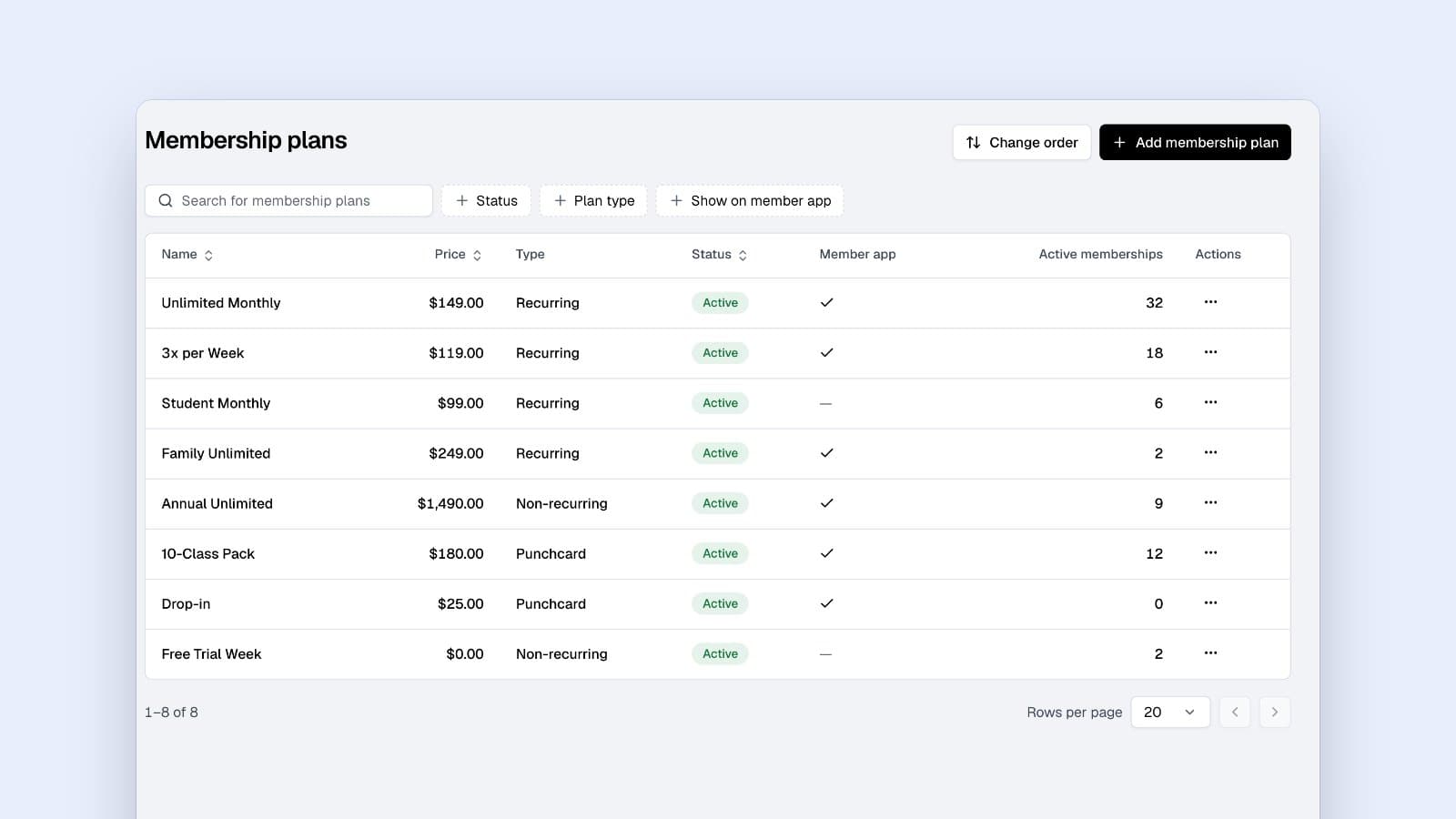
- Tools for creating and managing flexible membership plan templates (recurring, one-time, punchcard) with configurable pricing, commitment periods, check-in limits, class/appointment restrictions, and associated digital documents.
- Streamlined onboarding processes, including member data import (e.g., via CSV).
- Convenient check-in options such as QR code scanning (member app or staff-side), PIN entry, and manual staff check-in, all logged to attendance records.
Finegym provides these comprehensive membership management features, enabling efficient handling of the entire member lifecycle, from onboarding and plan assignment to ongoing engagement and tracking.
2. Class Scheduling and Booking
Fitness studio management software often includes scheduling tools that let members book classes and appointments. These systems can provide notifications for cancellations or rescheduled sessions.
Modern scheduling systems typically include:
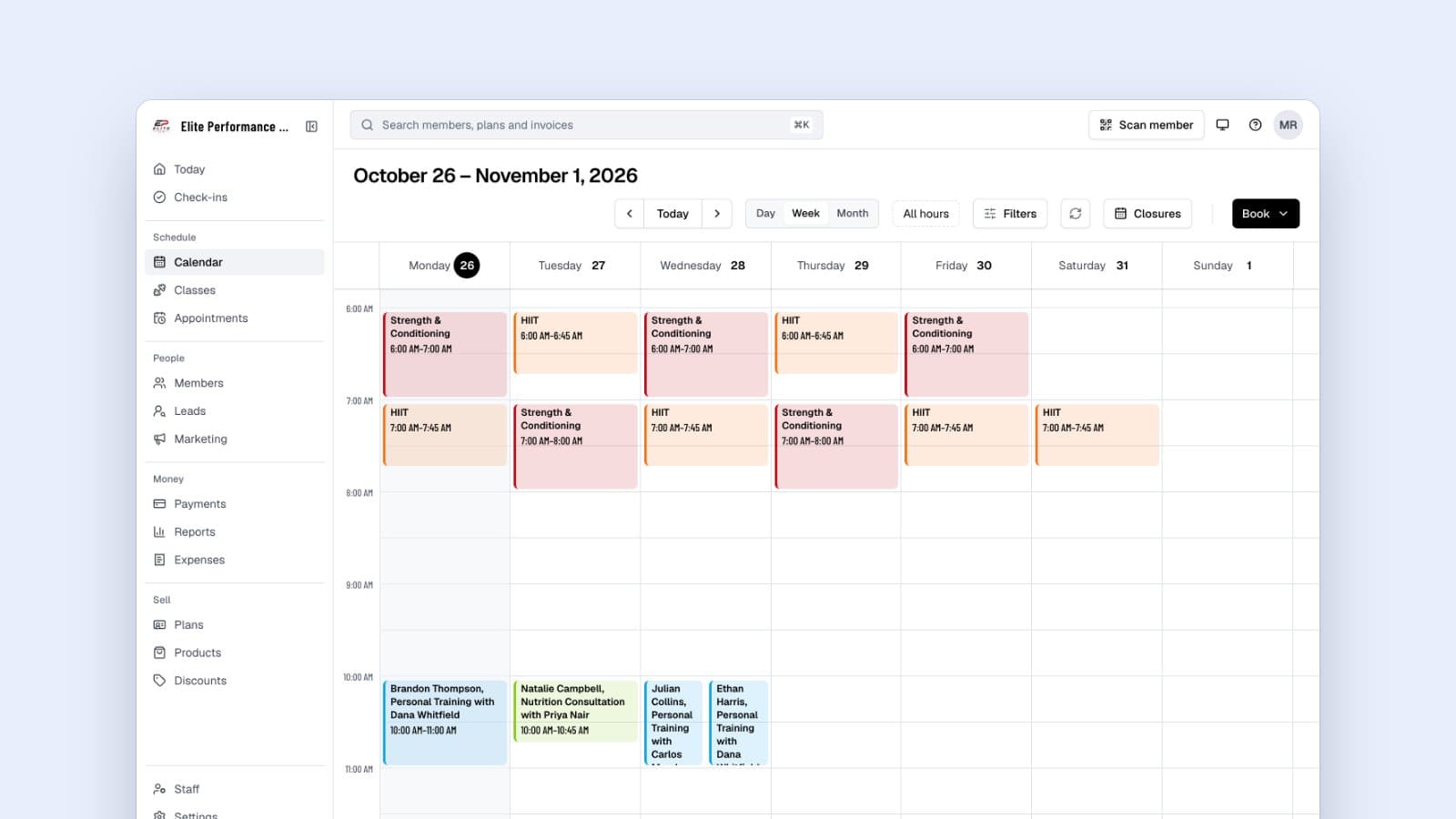
- A central calendar view (day, week, month) for staff to manage all scheduled activities.
- Tools for staff to define reusable class types (name, color, description, default capacity) and appointment types (duration, pricing, required staff).
- Functionality for staff to schedule single or recurring classes, assign instructors, and set specific class capacities.
- A dedicated member mobile app for members to view real-time schedules, book classes or appointments (selecting from their valid memberships if applicable), and manage their reservations.
- Waitlist management for full classes.
Finegym’s scheduling system offers these capabilities, with a web-based interface for staff and a mobile app for members, ensuring smooth booking and schedule management.
3. Billing and Payment Processing
Gym billing software helps automate payments and manage financial transactions. Look for software that supports multiple payment methods and integrates with payment gateways.
Effective billing systems typically include:
- Integration with payment processors like Stripe for online payments and managing recurring subscriptions.
- Options for manual entry of cash/card payments.
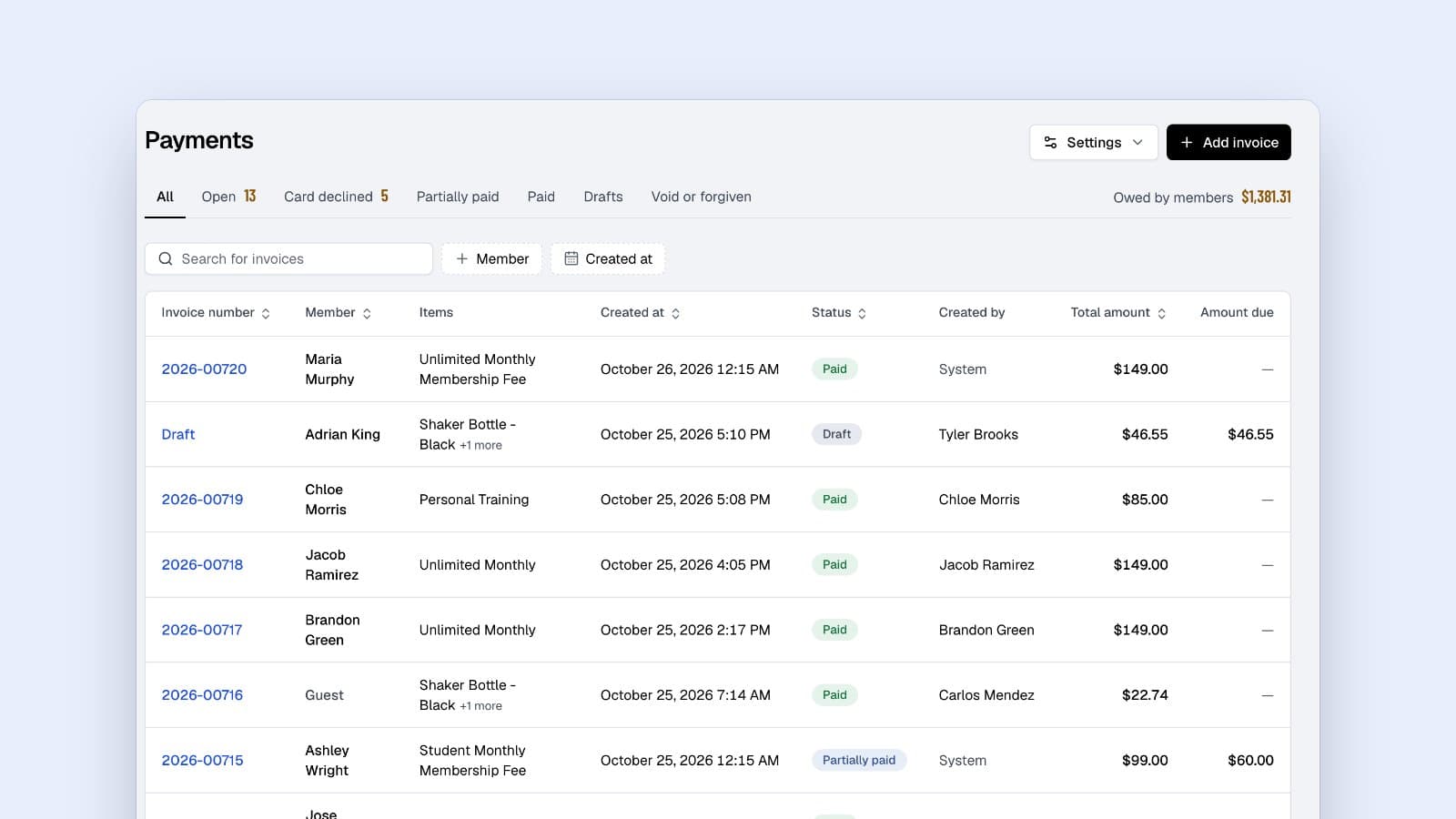
- Invoice generation, tracking (paid, pending, overdue), and management.
- Tools to create and apply discount codes.
- Secure transaction processing and logging.
- Management of the business's own subscription to the gym software itself (e.g., via a customer portal).
Finegym incorporates these billing features, leveraging Stripe for robust payment processing and providing tools for comprehensive financial management, including managing your Finegym subscription through the Stripe Customer Portal.
4. Reporting and Analytics
Fitness facility software offers reporting tools to track key performance indicators (KPIs) like retention rates, membership growth, and revenue.
Helpful analytics within gym management software typically include:
- A dashboard displaying key metrics (e.g., revenue, visits, new members) with selectable time intervals.
- Reports on membership statistics, including sign-ups and total member counts.
- Attendance analytics to monitor member visits, check-in patterns, and class popularity.
- Analysis of member referral sources.
- Date filtering options for most reports.
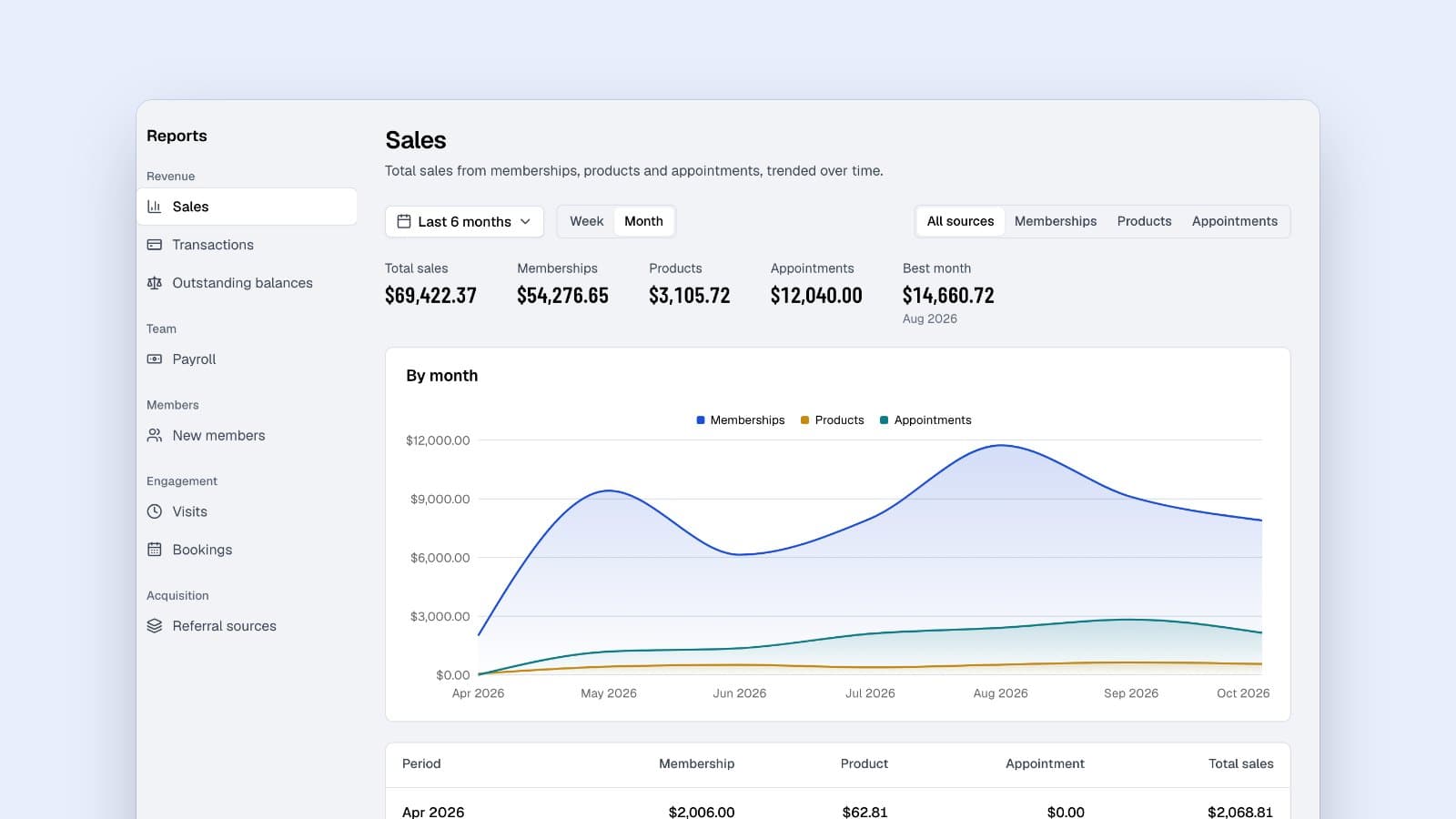
Finegym's reports cover sales, visits, bookings, new members and referral sources, with date filters and a comparison with the period before; it has no class popularity or retention-rate report. For modern approaches to member management, explore our guide to modern gym membership management systems.
5. Employee Management
Gym management software can include features for managing staff, their schedules, and roles.
Helpful staff management features include:
- A directory for staff profiles, contact information, and roles.
- Role-Based Access Control (RBAC) to define permissions and control access to system features.
- Tools for staff to set their availability for appointments or classes.
- Assignment of staff (e.g., instructors) to classes.
Finegym includes staff management tools with RBAC, allowing businesses to manage their team and control system access effectively.
6. Point of Sale (POS) Integration
For gyms selling merchandise, supplements, or other items, POS integration helps track inventory and manage sales.
Modern POS systems for fitness facilities typically include:
- Product management: Add items with details like name, description, images, categories, and pricing options/variants.
- Categorization of products.
- Tracking sales of products.
Finegym offers product management features, allowing fitness businesses to manage and sell retail items.
7. Marketing and Communication Tools
Fitness gym software often includes tools to communicate with members.
Useful marketing tools typically include:
- Email communication tools to send messages to individual members or in bulk.
- Customizable email templates for various communications (e.g., welcome emails, reminders).
- Push notifications to a member mobile app for booking confirmations, class reminders, or gym announcements.
- Member segmentation for targeted communications (often a capability of the broader member management system).
Finegym sends automatic emails you can switch on or off (such as booking confirmations and payment and renewal reminders), and its member app notifies members of changes to their bookings. It doesn't send class reminders. On the Growth plan, campaigns and automations send emails, texts and push notifications to all members or a segment.
8. Member Portal or Mobile App
A dedicated app or portal allows members to manage their interactions with the gym.
Effective member apps and portals typically include:
- Viewing class and appointment schedules.
- Booking and canceling classes or appointments.
- Managing their personal profile information.
- Viewing their active memberships and payment history.
- Accessing their attendance history.
- A digital check-in method (e.g., QR code).
- Receiving notifications from the gym.
- Viewing shared documents (e.g., waivers).
The Finegym member app (iOS & Android) provides these features, and members can sign documents in it.
Why Your Fitness Business Needs Gym Management Software
Gym management programs aren't just for streamlining operations—they can create a competitive advantage. Here's why they're beneficial:
- Time Savings: Automating tasks like billing, scheduling, and member communication can free up valuable time.
- Improved Member Experience: Features like online/mobile app bookings, self-service profile management, and easy check-ins enhance convenience.
- Better Decision Making: Access to data and analytics helps identify trends, optimize schedules, and understand member behavior.
- Scalability: The right software can support business growth, whether adding members, services, or locations.
- Enhanced Professionalism: Centralized systems for communication, billing, and scheduling project a more organized and professional image.
How to Choose the Best Gym Management Software
With many options available, here's how to select the best gym management software for your fitness center:
1. Define Your Needs
Start by identifying what your gym or fitness studio needs to operate more efficiently. Are you struggling with member retention? Do you need a better way to manage bookings? Knowing your pain points will help narrow down your options.
2. Consider Scalability
Your chosen gym management system should be able to grow with you. Look for affordable fitness center software that can handle additional members, locations, and services as your business expands.
3. Evaluate Features
Make sure the gym management software has the features you need. Review the list of key features above and match them against your requirements.
4. User-Friendly Interface
The software should be easy for you, your staff, and your members to use. A complex interface can lead to frustration and reduced productivity.
5. Integrations
Consider software that integrates with essential third-party services. For example, payment gateways (like Stripe), accounting software, marketing automation tools (like Zapier for broader connectivity), analytics (like Google Analytics), and customer support platforms (like Freshworks).
6. Trial or Demo
Most gym software providers offer free trials or demos. This is a great way to understand the user experience and evaluate whether it meets your needs.
7. Cost Efficiency
While affordability is important, consider the value the software provides rather than just the price. Look for a solution that offers the best value for your budget.
Implementation Tips for Gym Management Software
Once you've chosen fitness studio management software, implementing it effectively is crucial.
1. Plan Your Rollout
Implement your gym management system in phases to avoid overwhelming your team. Start with the most critical operations.
2. Train Your Staff
Invest in staff training to ensure everyone understands how to use the software effectively. This minimizes frustration and increases adoption.
3. Migrate Your Data Carefully
Work with the software provider or use available tools (e.g., CSV import for member data) to ensure a smooth transition of member details, existing bookings, and payment information. For comprehensive implementation guidance, see our implementing gym management software guide. Finegym offers member data import tools, and data migration is free on every plan.
4. Inform Your Members
Communicate the changes with your members, highlighting the new features and benefits. This keeps them informed about the upgrade.
5. Monitor Performance
After implementing your fitness center management software, track its performance over time. Look for ways to further optimize and improve processes.
About Finegym as a Gym Management Solution
Finegym is a gym management platform designed to streamline operations for gyms and fitness studios. It combines a web application for owners and staff with the Finegym member app.
Comprehensive Feature Set
- Member Management: Centralized directory with filtering, detailed member profiles (personal info, attendance, memberships, payments, reservations, documents, notes, communication logs), digital waiver creation and e-signatures, and CSV member data import.
- Scheduling & Booking:
- Staff Web App: Intuitive calendar (day/week/month views) to define class types (name, color, capacity), schedule single or recurring classes, assign instructors, manage appointment types (duration, staff, pricing), and book appointments for members.
- Member Mobile App (iOS & Android): Real-time schedule viewing, easy booking and cancellation for classes and appointments, ability to select from valid memberships during booking.
- Billing & Payments: Stripe for online card payments (one-time and recurring subscriptions), automatic retries of declined card renewals, recorded cash and other payment methods (such as bank transfers), automated invoice generation and management, discount code creation and application. Business owners manage their Finegym subscription on Stripe's billing page.
- Check-In System: Flexible check-in options including member QR code scanning (via member app or staff-side scanner), PIN code entry, and manual staff check-in. All check-ins are logged for attendance tracking. A dedicated front desk mode is available for kiosk setups.
- Staff Management: Staff roles (Owner, Manager, Front desk, Coach, Custom) with job-named permissions, staff profiles with pay rates, and coach availability for appointments.
- Product Sales: Manage a catalog of products with details like name, description, images, categories, variants (such as sizes) with their own prices, and stock. Staff sell them at the desk on an invoice.
- Reporting & Analytics: Key figures (sales, visits, new members) compared with the period before, reports on visits, bookings, new members, referral sources, sales and payroll, with date-filtering capabilities.
- Communication Tools: Automatic emails you can switch on or off, with each member's communication history on their profile. The member app notifies members of booking changes. Campaigns and automations (email, text and push notifications) are on the Growth plan.
- Business Settings & Customization: Configure general business information, upload logos for branding, set localization (language, timezone), manage tax rates, create and manage digital documents (e.g., waivers) for members to sign, define business policies, create custom note tags, add Google Analytics or Meta Pixel tracking to your website, and connect integrations (Kisi, Twilio, Zoom, QuickBooks Online, Wellhub and Zapier, on the Starter plan and up).
User Experience & Technology
- Web App (for Owners & Staff): Built with modern technologies (React, Vite, Tailwind CSS) for a responsive user experience across devices.
- Member Mobile App: A cross-platform React Native application (iOS & Android) styled with Tailwind CSS (
twrnc), offering a clean, user-friendly interface for members to interact with the gym. - Dark Mode: Supported in the web application for user preference.
Support & Implementation
- Customer Support: Email support on the Free plan, priority phone and email support on Starter and Growth, and step-by-step guides in the help center.
- Data Migration: Tools for importing existing member data, and free data migration on every plan.
- Ongoing Development: Finegym is updated regularly with new features and enhancements.
Subscription & Scalability
- Tiered Plans: Finegym has three plans: Free, Starter ($79/month) and Growth ($149/month), free for up to 50 active members and with no member limit on the paid plans. Integrations come with Starter and up; marketing and a branded member app with Growth.
- Transparent Billing: Business owners can manage their Finegym subscription details, view invoices, and update payment methods through the Stripe Customer Portal.
Finegym aims to be a valuable partner, providing the tools and support necessary for fitness businesses to operate efficiently and grow.
Start Simplifying Your Workflow Today
Implementing gym management software can be an important step in today's competitive fitness industry. With a solution like Finegym, you can potentially spend less time on administrative tasks and more time focusing on what you love—helping people achieve their fitness goals.
Your Next Step
Ready to learn more about how Finegym can help your fitness business?
- Get Started for Free to see Finegym in action.
- Explore our Features and Pricing Plans.
- Or Sign Up Today to get started!
Explore the platform at your own pace and see for yourself how Finegym can be tailored to your business needs.
Sobre o autor
Founder & CEO
Vedad Burgic is the Founder and CEO of Finegym, a gym management platform built to help fitness businesses streamline operations and grow. With a background in software engineering and a passion for the fitness industry, Vedad created Finegym to solve the real challenges gym owners face every day — from scheduling and billing to member retention. He writes about gym management strategy, fitness technology, and building scalable fitness businesses.
Receba os novos artigos por e-mail
Receba os últimos artigos e dicas na sua caixa de entrada.